 agrē Release Notes 2.25.02 - June 25, 2025
Last updated: June 30, 2025
What's New & Improved in agrē 2.5.02:
Additional process information from FCL may follow the release.
 Top 5 agrē Highlights from this Release
 Auto Order Expansion – Functionality now available to all suppliers, with the ability to exclude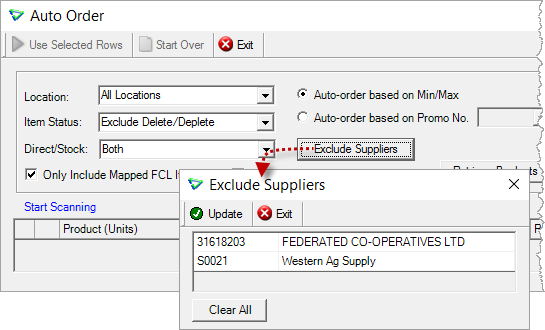
 Inventory Activity Reconciliation Report – Sort and Total by Purchase Invoice Reference; View Supplier Location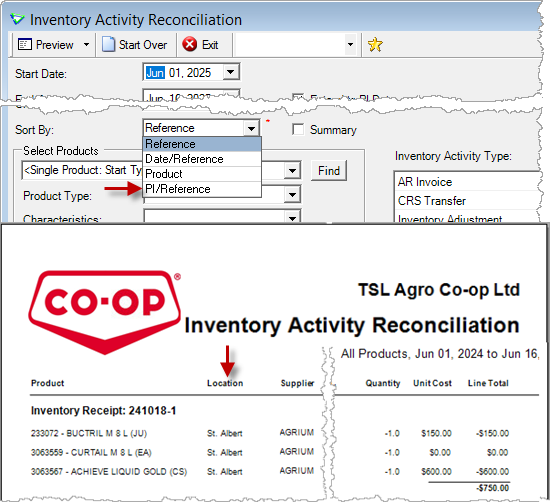
 Document Management – Manage the documents without editing the invoice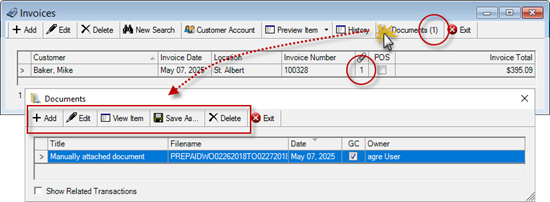
 AgCollect Improvements – Simplified Manufacturer set-up for AGDATA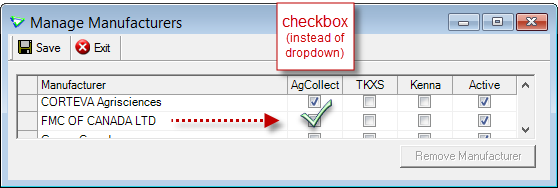

Security
This symbol  indicates that your Local Company Security Administrator needs to make a security permission change to allow user access to the new feature.
Configuration Options
This symbol  indicates a new feature integrates with a Configuration Option (at either the Company, Location, or User level).
Note
Release Notes highlight the best new features and improvements from each release of agrē. In case you missed a prior version, Release Notes for the last two years are available from the online Help Release Note archives.
Accounts Receivable
Invoices
Manage attached Documents directly from the home form (and no need to edit the invoice to view the attachments).
These may include photos, copies of signed documents, completed transportation documents, supporting/misc documentation, etc.

For more information about other enhancements related to document management, please read the white paper (with lots of screenshots) about CRM and Document Management
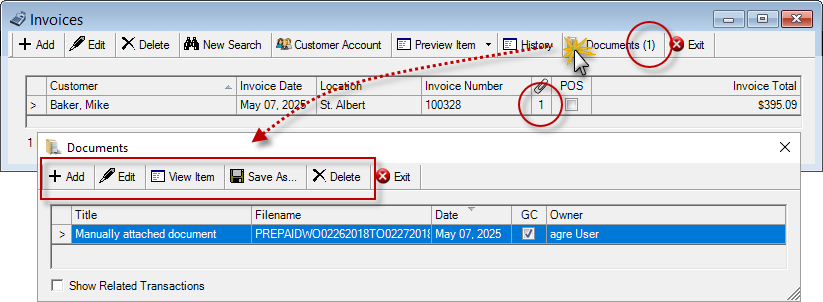
Accounts Receivable > Invoices
Tip
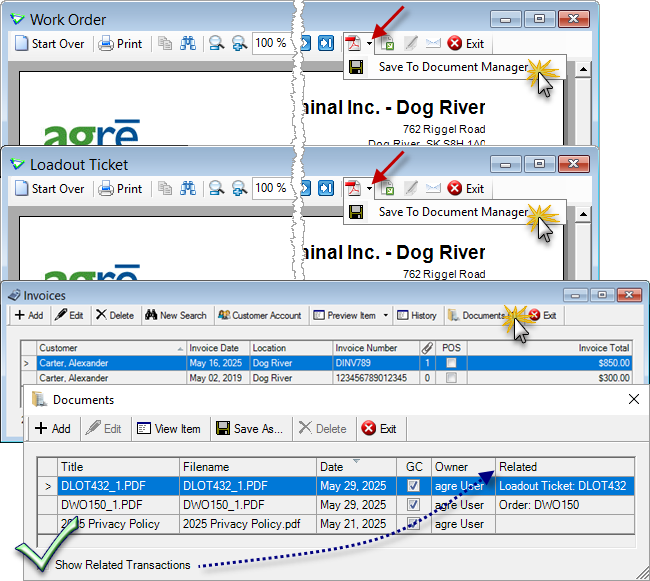
If you've saved eDocuments of the linked work order and the linked loadout ticket, Show Related Transactions allows them to be viewed from here as well.
Work Orders
Closing / Extending
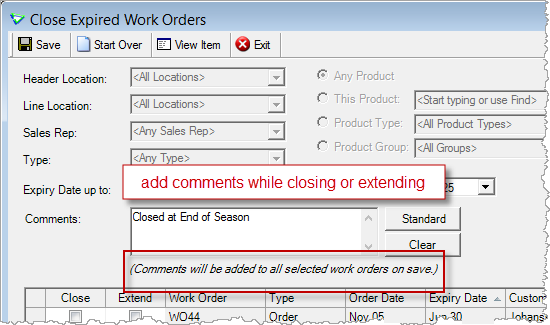
When closing or extending work orders, optionally add Comments to each one.
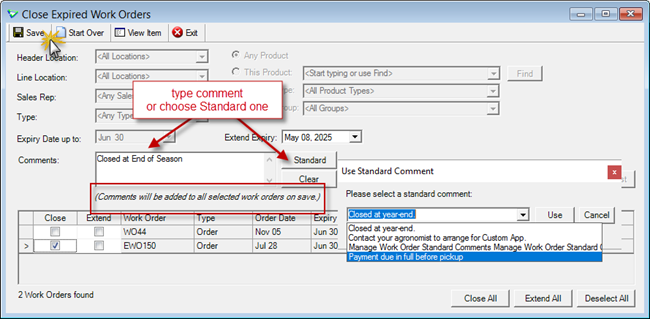
Accounts Receivable > Close Expired Work Orders
Emailer
Email customer work orders all at once.
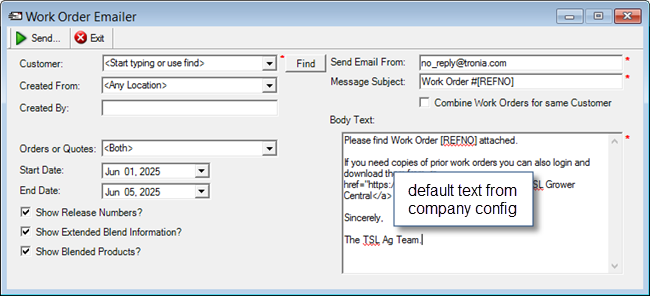
AR > Email Reports > Work Orders
AR Release Numbers
Starting Service Date (from work order) added to home form.
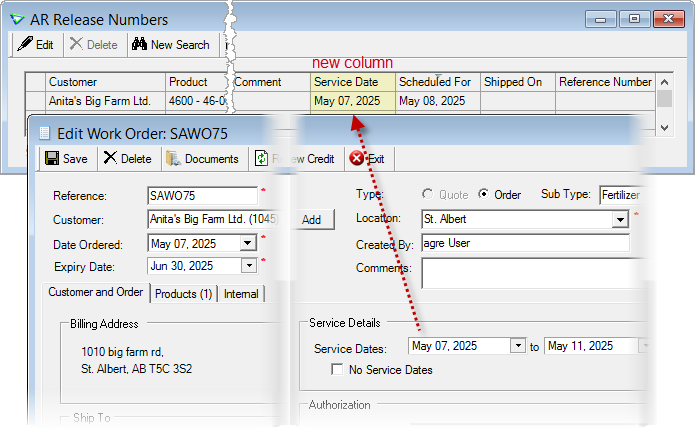
Accounts Receivable > AR Release Numbers
CRM
I want to read the white paper (with lots of screen shots) about CRM Customer Relationship Management
Customer Activity Categories
Secondary Categories can be assigned by selecting [...] and will display on the home form.
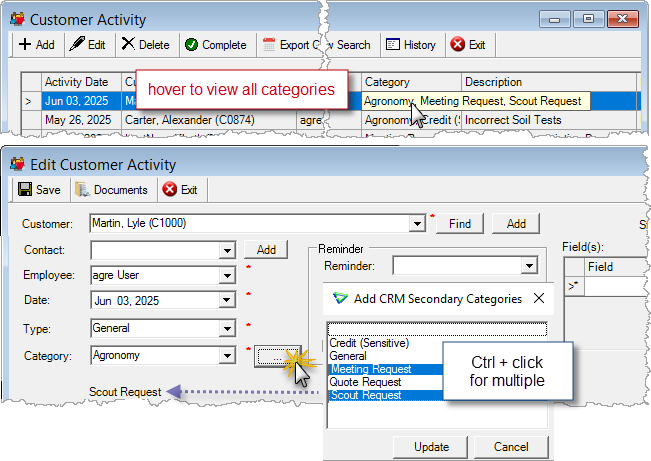
Accounts Receivable > CRM > CRM Activities
Document Manager
Link documents to transactions directly from the Customer or Supplier Account.
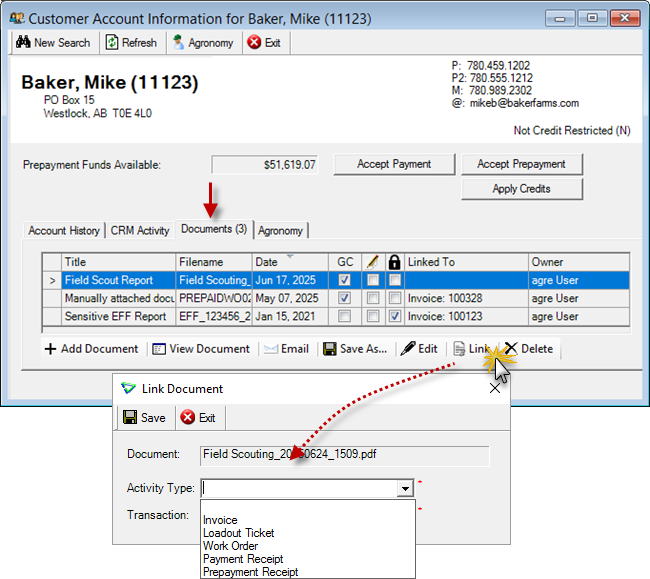
Accounts Receivable > Customer Accounts
Inventory
Inventory Receipts
Location added to inventory receipts window.
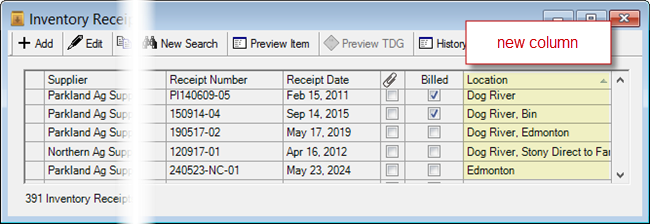
Inventory > Inventory Receipts
Manual Counts
If there is an issue with a product (e.g. it was deactivated) when saving a manual count, agrē will let you know which one it is.
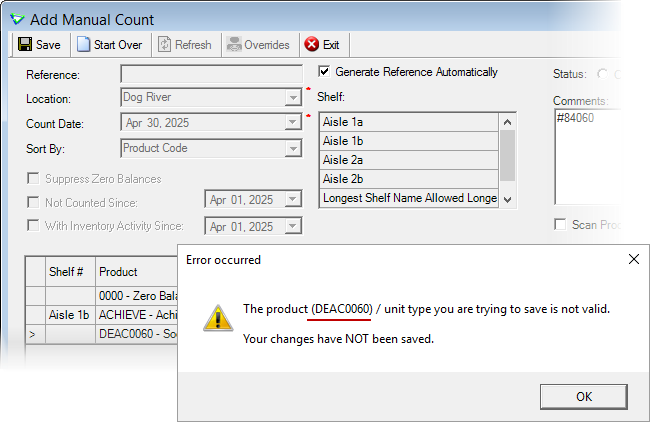
Inventory > Manual Counts
Manufacturers - AgCollect (AGDATA) and FMC
The EMR drop down has been replaced with an AgCollect checkbox.
All manufacturers that had an associated EMR manufacturer will be flagged as AgCollect during deployment.
FMC now reports to AgCollect.
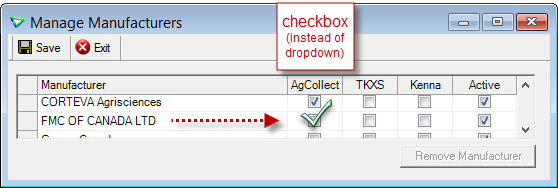
Inventory > Manage > Manufacturers

I want to read the white paper on how to setup manufacturers for AgCollect Export (with lots of screenshots).
Accounts Payable
Purchase Orders
eOrder Status
Supplier Account displays eOrder Status.
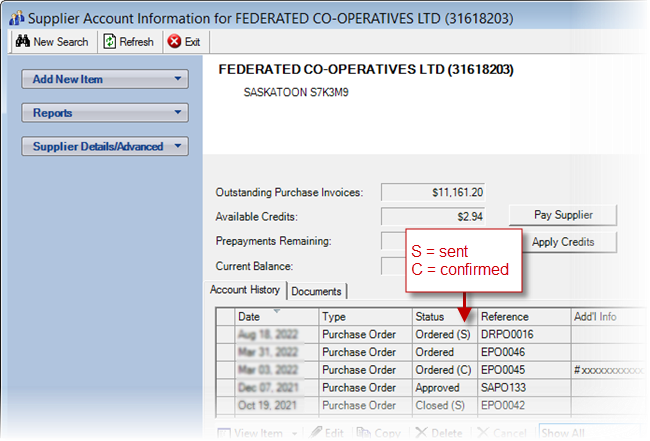
Accounts Payable > Supplier Accounts
Auto Orders
Auto Order can be used for all products (mapped or not) and all suppliers.
Supplier Product Code Mappings are set per product.
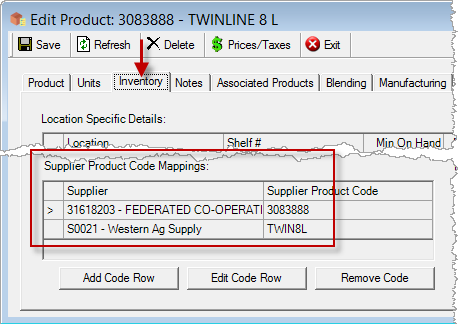
Inventory > Manage > Products
When creating Auto Orders, you can choose to Exclude Suppliers (which excludes their products as well).
Select one or multiple suppliers to omit their products from the list retrieved.
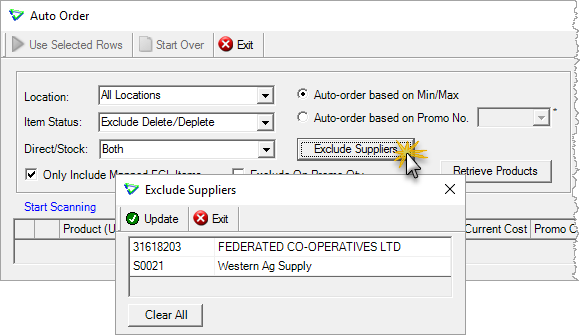
Accounts Payable > Purchase Orders | Auto Order || Exclude Suppliers
Document Manager
Link documents to transactions directly from the Supplier Account.
I want to read the white paper (with lots of screen shots showing how to use the document manager) about CRM Customer Relationship Management
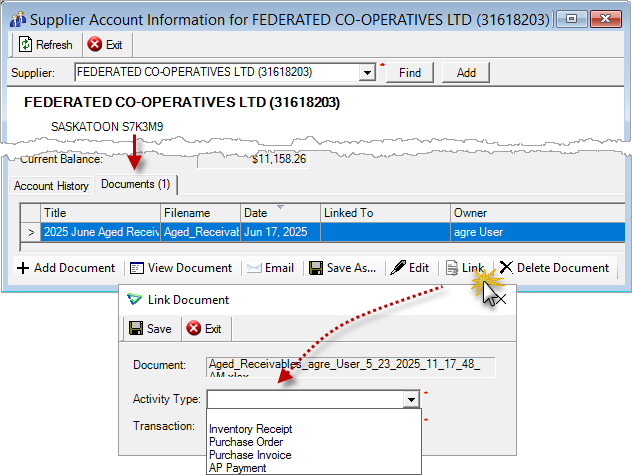
Accounts Payable > Supplier Accounts
Reports & Exports
Note
Security settings are managed by your local company security administrators. As with all new features, we don’t presume to know who should have access to new Exports and Reports and who should not so we leave that up to them.
Updates to Current Reports
Updates to Current Exports
| Export Name | What's New? |
|---|---|
| AR / Customer Sales | data: WO Subtype (changes column order) |
| AR / Manufacturer Sales (FMC) | removed; FMC sales now reported to AgCollect (AGDATA) |
| INV / Inventory Balances | data: Supplier Product Codes (changes column order) |
| INV / Product List | data: FCL Item Status, Direct/Stock Code data removed: Sec FMC Manuf (changes column order) |
| INV / Inventory Received | data: [Supplier] Location (changes column order) |
| INV / Inventory Transfers | data: Unit Cost, Cost/Price |
Configuration Options
Note
Company Configuration Options are managed by your local company agrē administrators. As with all new features, we don’t presume to know if your administrator would enable a new Config Item or not so we leave that up to them.
New config options are released OFF unless they are replacing/enhancing existing items, in which case we do our best to match existing functionality. Any exceptions would be noted.
Company Config Options
Last Sold
To improve performance, Last Sold details will display on demand.
Check Pre-populate last sold information to display by default.
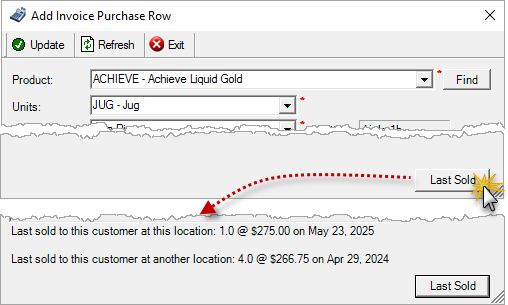
e.g. Accounts Receivable > Invoices > Add Product Row
| Tab / Subtab | Config Item | Description |
|---|---|---|
| General | Pre-populate last sold information | deployed OFF to improve performance |
| AR / AR Emailers | Work Order Emailer: Message Subject, Body Text, Combine Multiple | default text for new work order emailer |
| AP / PO | Copy Purchase Order - Include Dates | copies order, expected delivery, and expiry dates from original PO |
| INV | Inventory Adjustment: Sub Type is mandatory | inventory adjustments require sub type |
| Report / Options | Default Excel Format | removed - all Excel files saved as .XLSX |
User Config Options
| Tab / Subtab | Config Item | Description |
|---|---|---|
| Default Location | new tab | moved from Miscellaneous |
Security
Note
Security settings are managed by your local company security administrators. As with all new features, we don’t presume to know who should have security permission and who should not so we leave that up to them.
New security permissions are released UNCHECKED unless they are enhancing existing permissions, in which case we do our best to match existing functionality. Any exceptions would be noted.
Role Permissions
| Tab | Item | Action(s) |
|---|---|---|
| Accounts Receivable | Email Work Orders | Enable on menu |
 Agronomy
Agronomy Centre
On Screen Descriptions for Customer Accounts also pop up for the Agronomy Centre.
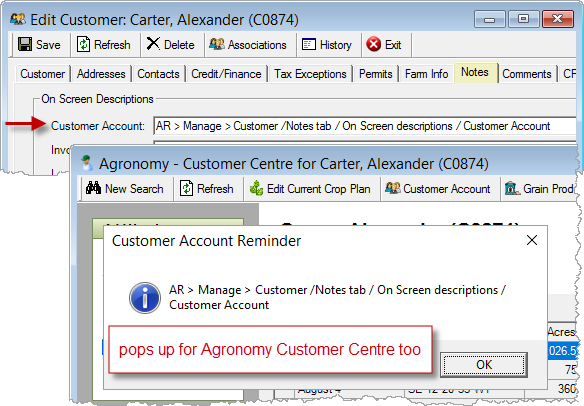
AR > Manage > Customer // Agronomy > Agronomy Customer Centre