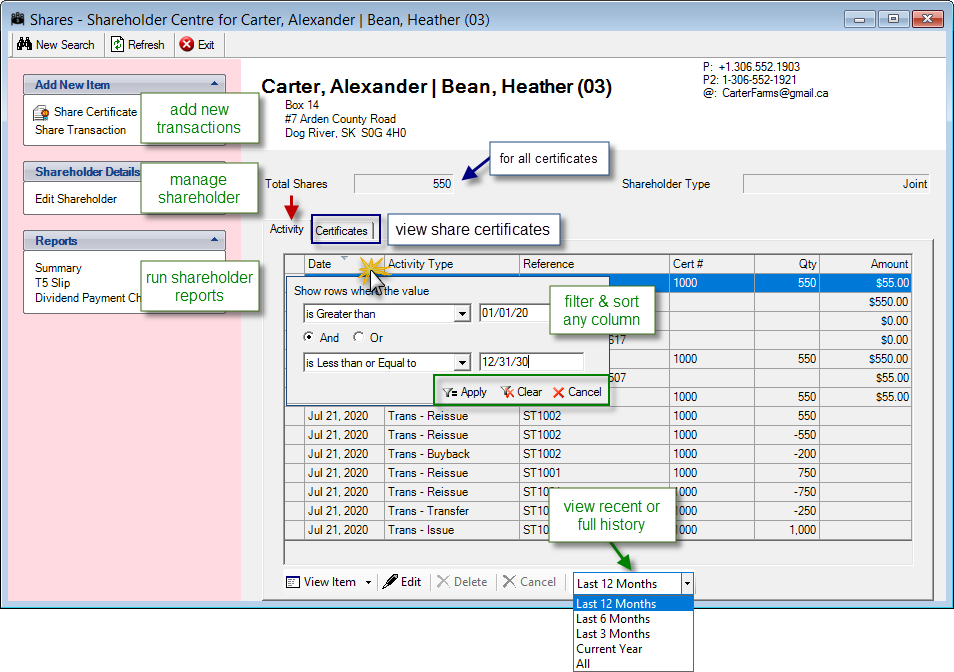
The Shareholder Centre window is where you can work with all aspects of a shareholder. At a glance, you can view the shareholder's information: Total Shares, Shareholder Type, recent Activity, and Certificates.
You can view the shareholder’s recent activity, such as dividends paid or shares transferred. To view a detailed report for an item, select the item from the list to view and then click View Item (click the down-arrow next to View Item to Preview Posting Details). To edit and/or delete items, select the item to edit and/or delete and then click Edit or Delete .
I want to read Shares Setup and Transactions (with lots of screenshots).
Tips
You can sort and apply filters to the documents in the grids to narrow the list down to just the ones you want to see. These filters can be applied to any column. Clear the filter when you want to see all rows again.
General Ledger > Shares > Shareholder Centre