 agrē Release Notes 2.26.01 - February 25, 2026
Last updated: February 25, 2026
What's New & Improved in agrē 2.26.01:
 Top 5 agrē Highlights from this Release
 AP-Only Unit Types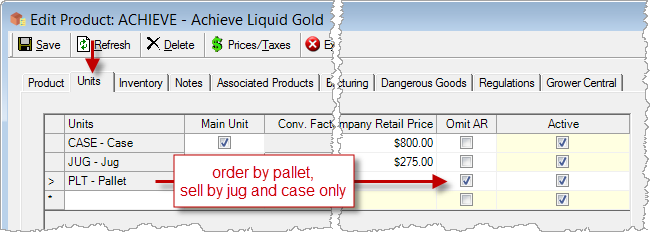
 Future Date Purchase Invoices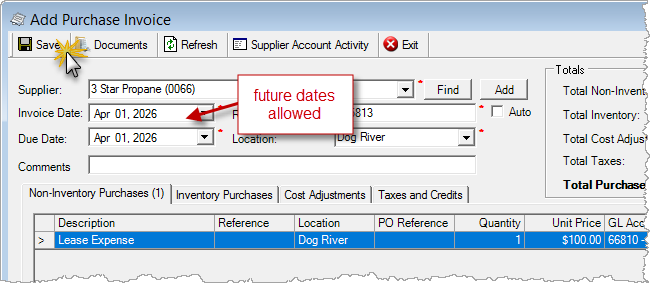
Security
This symbol  indicates that your Local Company Security Administrator needs to make a security permission change to allow user access to the new feature.
Configuration Options
This symbol  indicates a new feature integrates with a Configuration Option (at either the Company, Location, or User level).
Note
Release Notes highlight the best new features and improvements from each release of agrē. In case you missed a prior version, Release Notes for the last two years are available from the online Help Release Note archives.
Account Centres
Search for Active, Inactive, or Both
View an account of any status on the:
- Customer Account Centre
- Agronomy Centre
- Supplier Account Centre
- Grain Producer Centre
- Grain Buyer Centre
- Shareholder Centre
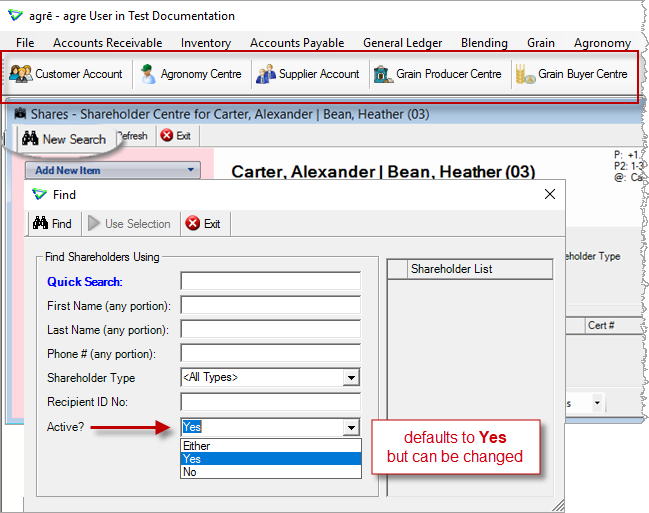
search for inactive customers/growers/suppliers/producers/buyers/shareholders
Accounts Receivable
Customer Accounts
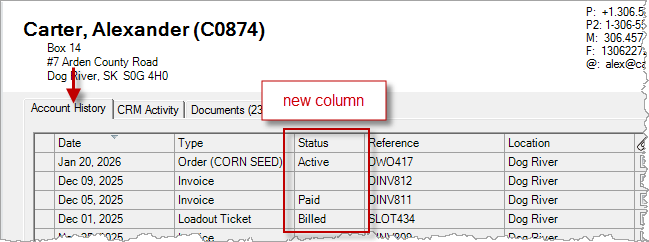
Account History
New Status column.
Additional account history date ranges, ability to set default.
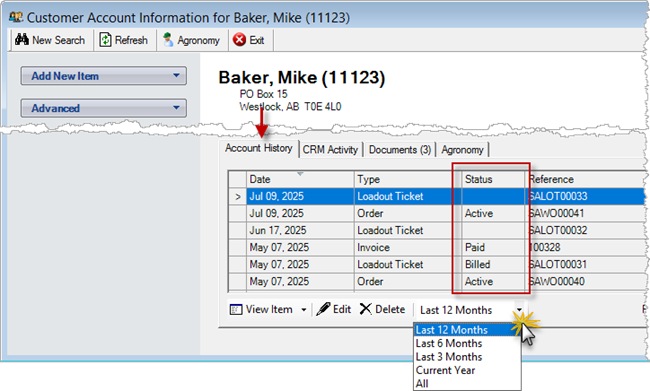
Accounts Receivable > Customer Accounts
3rd Party Credit
Duplicate Account #s
Multiple customers can share the same credit line.
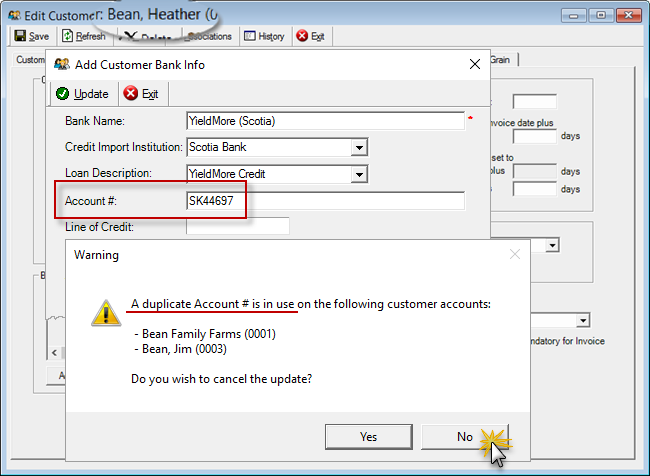
Accounts Receivable > Manage > Customer
Secure Balances
Allow or deny permission to view 3rd party credit balances on Customer Accounts ...
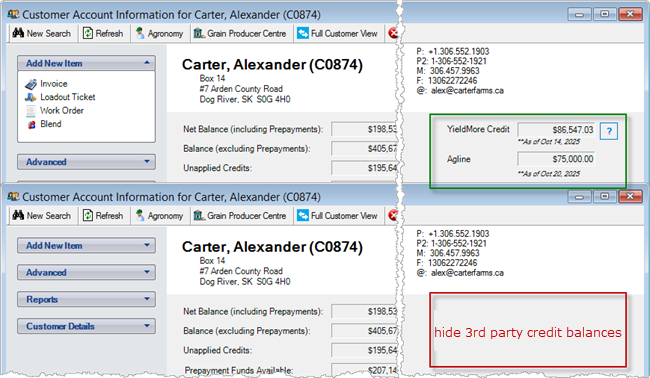
Accounts Receivable > Customer Accounts
... and View Credit (which is secured separately).
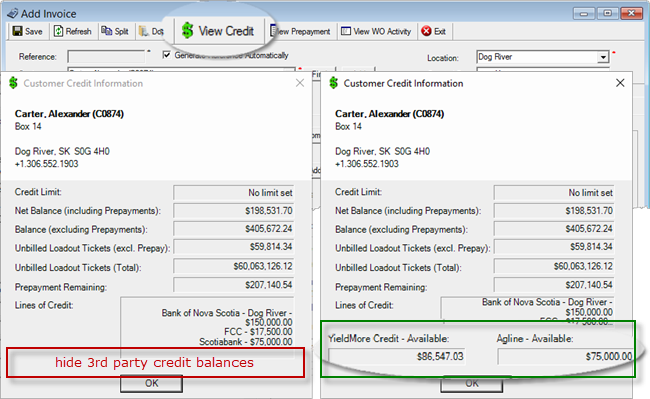
e.g. Accounts Receivable > Invoices (and wherever View Credit is available)
Loadout Tickets
Displays linked WO Ref # & Sub Type.
Use your mouse to change column widths.
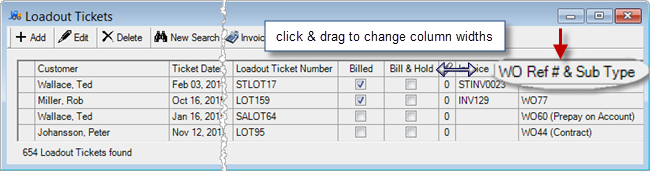
Accounts Receivable > Loadout Tickets
AR Release Numbers
Skip the loadout ticket and go straight to Invoice.
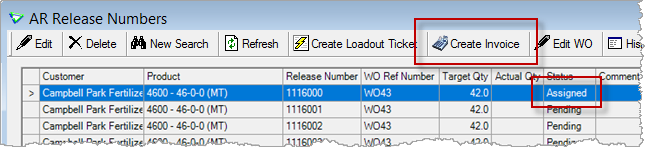
Accounts Receivable > AR Release Numbers
AR release numbers can be Cancelled. Quantity will be reported as 0.
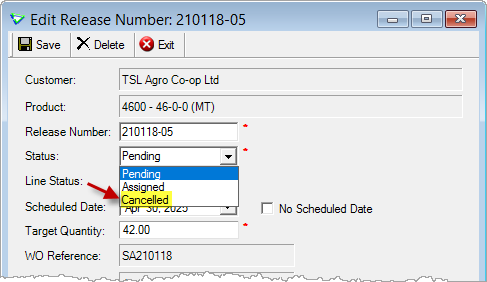
Accounts Receivable > AR Release Numbers
CRM
CRM Activity Summary Report
Start Date and End Date search Activity Detail Date too.

I want to read CRM Customer Relationship Management (with lots of screen shots).
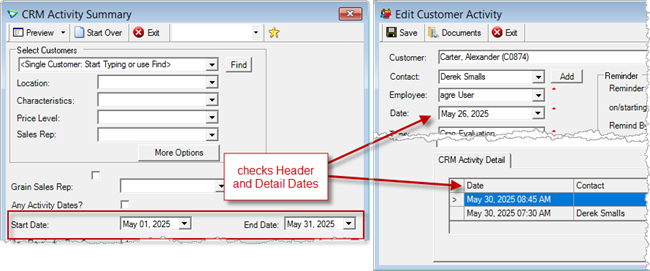
Accounts Receivable > Reports > CRM Activity Summary
Accounts Receivable > CRM > CRM Activities
 Blending
Additional Products & Application Rates
To have Additional Products included in blend added to the application rate on batch sheets and price sheets ...

I want to read Blend Type Setup (with lots of screen shots)
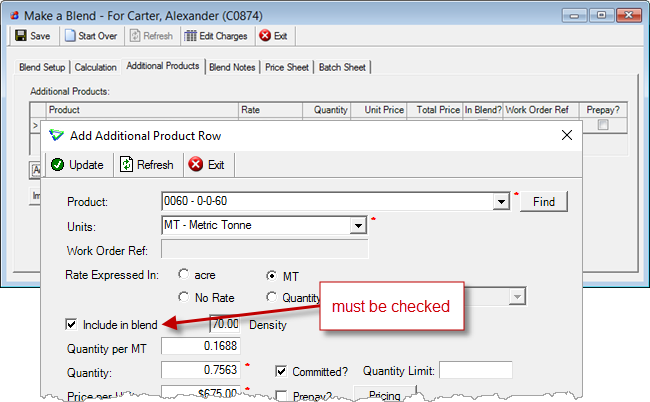
Blending > Make a Blend
... check Include Additional Products in Application Rate on the blend type.
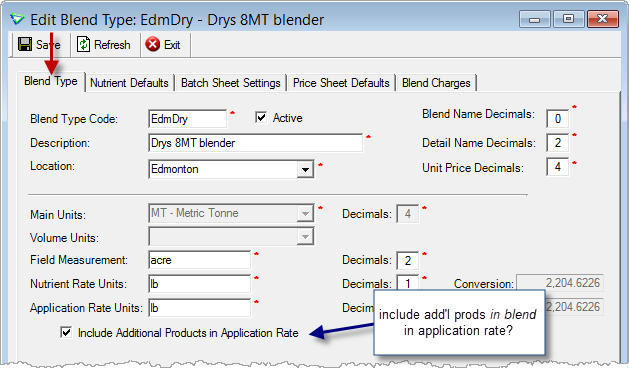
Blending > Manage > Blend Types
The Application Rate on the blend remains unchanged ...
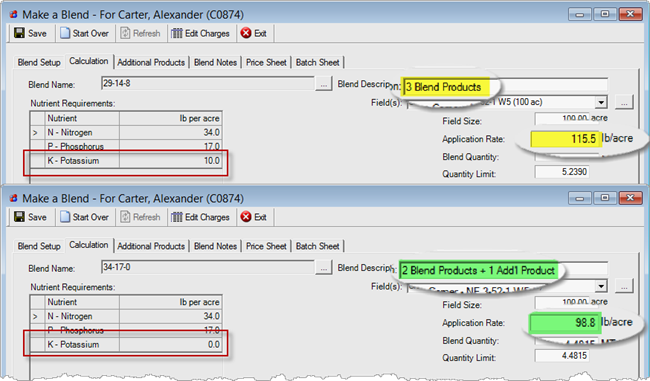
Make a Blend (comparing 2 blends)
... but the Application Rate on the batch sheet and price sheet will include the additional product.
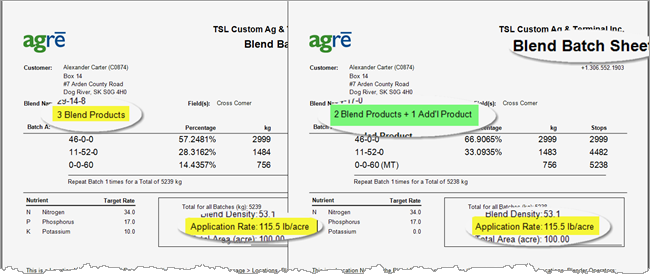
Make a Blend > Batch Sheet (comparing 2 blend batch sheets)
Automated Blenders
AGI Yargus / Layco
Support for Additional Products in Blend.

I want to read Automated Blender Setup and Work Flow (with lots of screen shots)
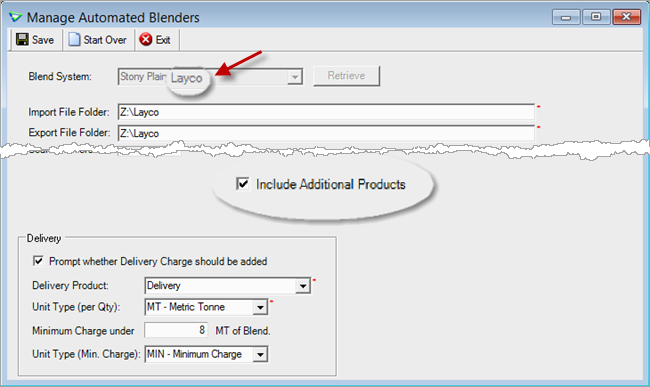
Blending > Manage > Automated Blenders
Inventory
Manage Products
Omit AR
You buy Pallets, but you sell Jugs.
Check Omit AR to ensure pallets can't be added to work orders, loadout tickets, or invoices.
 I want to read how Omit AR is used with the WinField B2B eOrder Process
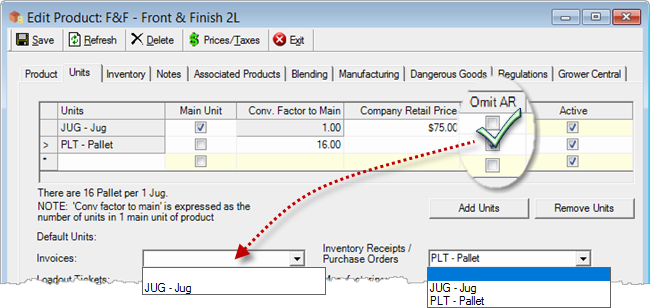
Inventory > Manage > Products
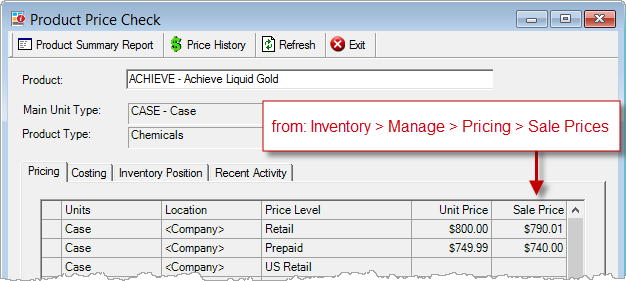
Product Price Check
Sale Prices are displayed on the Pricing tab.
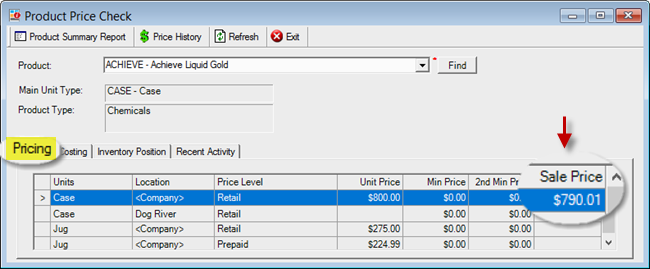
Inventory > Product Price Check
Release Numbers
Create Inventory Receipts for multiple release numbers at the same time.
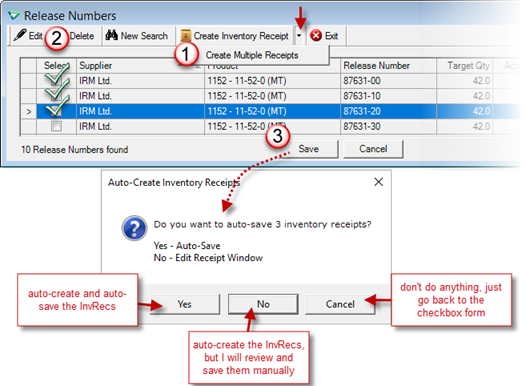
Inventory > Release Numbers
Release numbers can be Cancelled. Quantity will be reported as 0.
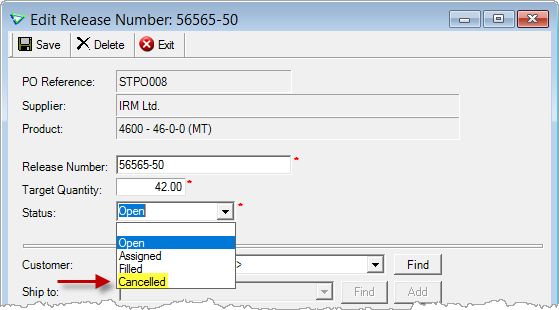
Inventory > Release Numbers
Inventory Transfer Adjustments
Inventory Transfer Adjustments are used for adjustmenting corresponding incoming and outgoing products. The concept is similar to manufacturing, but with inventory transfers there are no costing dependencies between the "raw ingredients" and the "manufactured product".
Transfer adjustments were designed to "manufacture" a product, like a particular grade of grain or fuel, by combining together different grades of similar products. For example, you're out of Grade 2, but you can make some by mixing equal amounts of Grade 1 and Grade 3.
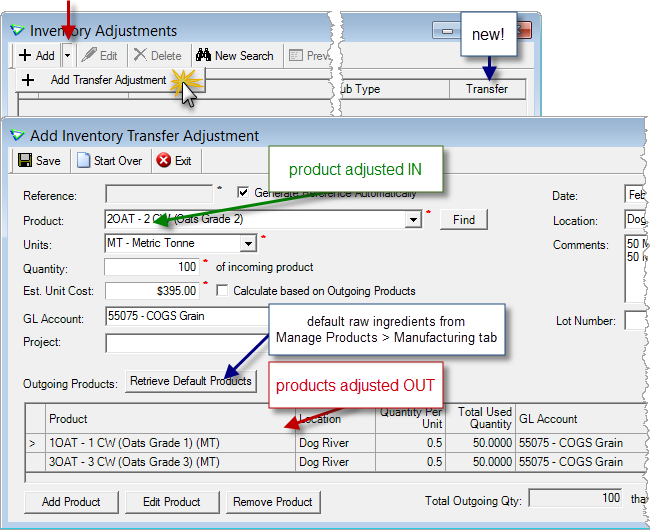
Inventory > Adjustments / Add Transfer Adjustment
Accounts Payable
Supplier Accounts
Account History
Additional account history date ranges, ability to set default.
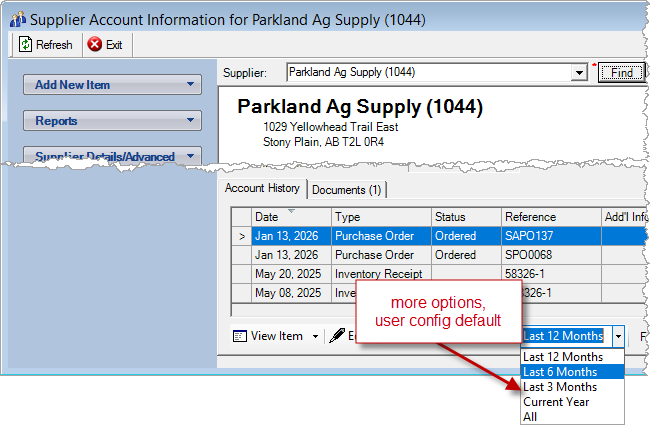
Accounts Payable > Supplier Accounts
Purchase Invoices
Non-Inventory Purchases
Purchase Invoices for non-inventory items can be future-dated, for example to print off 12 months of cheques in advance.
Postings to the GL are made on the future Invoice Date.
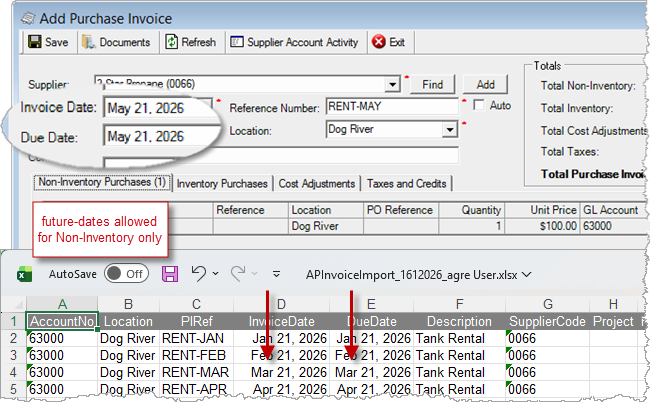
Accounts Payable > Purchase Invoices > Add/Edit
Accounts Payable > Purchase Invoices > Import
Find a ledger account faster.
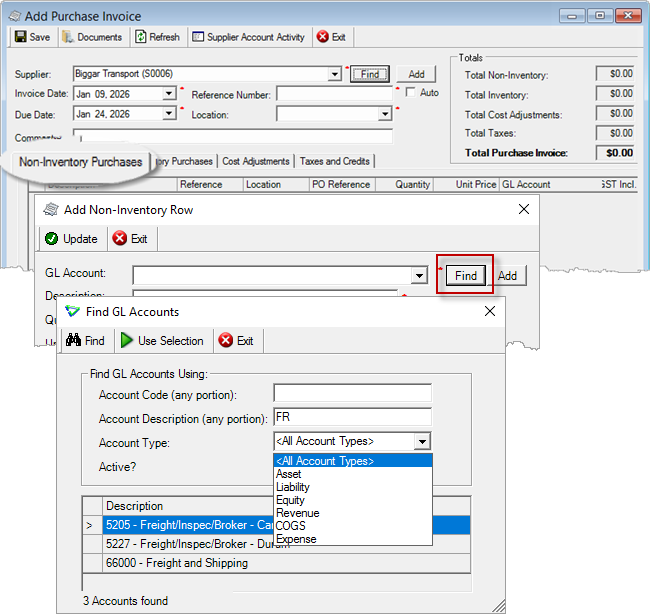
Accounts Payable > Purchase Invoices
Cost Adjustments
New Cost Adj column - see at a glance if an activity has been cost-adjusted.
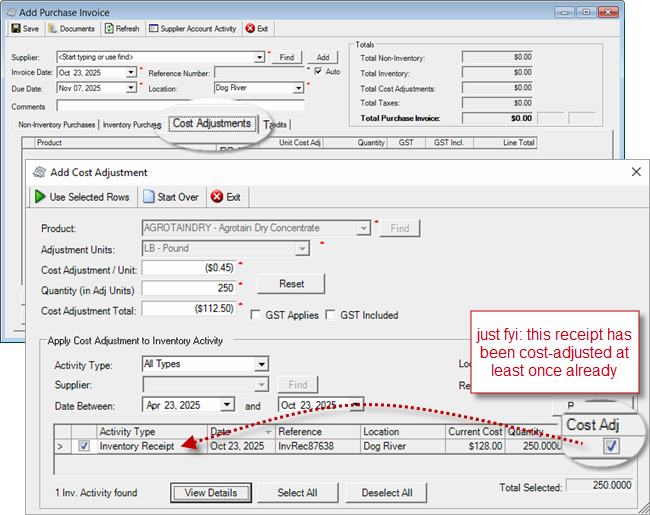
Accounts Payable > Purchase Invoices
Supplier Payments
EFT Confirmation Email
Supplier Name and Supplier Code are included with the payment details.
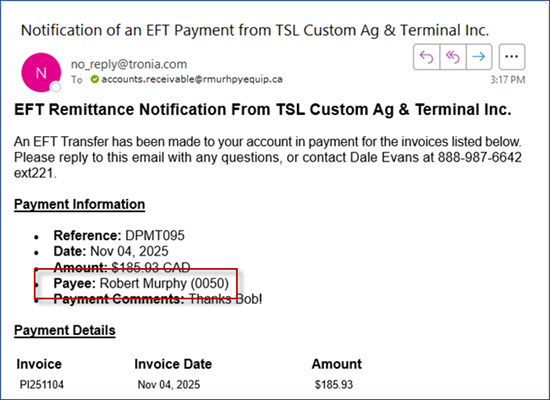
Supplier EFT Payment Notification Email
General Ledger
Journal Entries
Attach Documents
Manual journal entries can have Documents attached (which can be viewed from the home form without editing the JE).
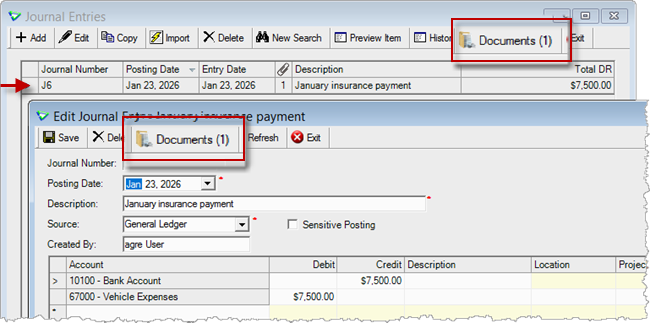
General Ledger > Journal Entries
Paymate Payroll Imports
Imported postings can be edited, copied, deleted, and searched for.
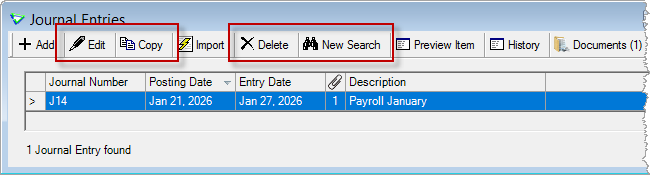
General Ledger > Journal Entries
Fixed Assets
CCA Schedules
New: Class 1.3 (10%) - Building Manufacturing and Processing
(deployed January 8)
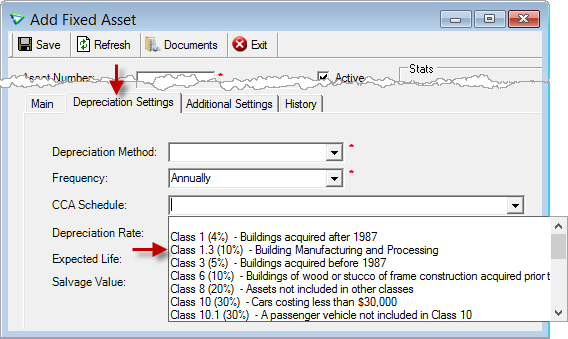
General Ledger > Fixed Assets > Manage Fixed Assets
Shares
Shareholder Centre
New shareholder Reports shortcuts.
Additional account history date ranges, ability to set default.
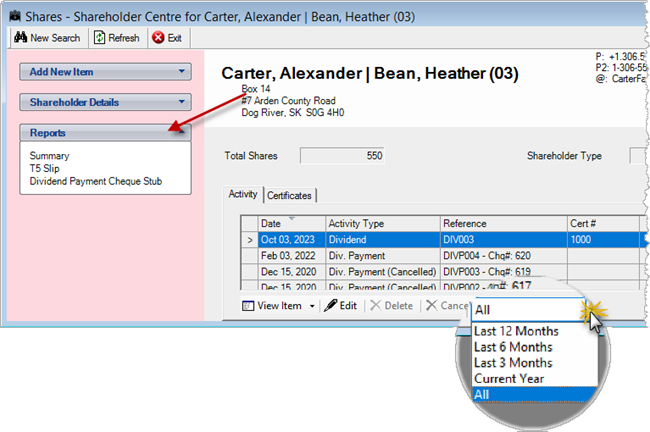
General Ledger > Shares > Shareholder Centre
Shareholders
New shortcuts:
- Activate/Deactivate
- Shareholder Account
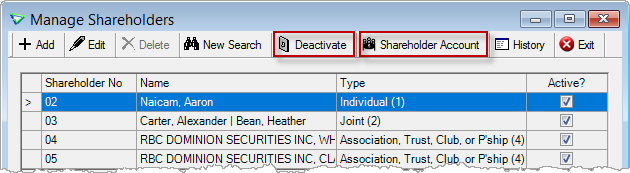
General Ledger > Manage > Shareholders
Reports & Exports
Note
Security settings are managed by your local company security administrators. As with all new features, we don’t presume to know who should have access to new Exports and Reports and who should not so we leave that up to them.
New Reports
| Report Name | Description |
|---|---|
| General Ledger / Fixed Asset Activity | list of fixed asset activity affecting book value |
Updates to Current Reports
New Exports
| Export Name | Description |
|---|---|
| Audit/Admin Work Order Changes | changed values for specific fields on the work order header |
| Audit/Admin Work Order Details Changes | changed values for specific fields on the work order detail line |
Updates to Current Exports
Which export was I running again?
Export name is displayed above criteria.
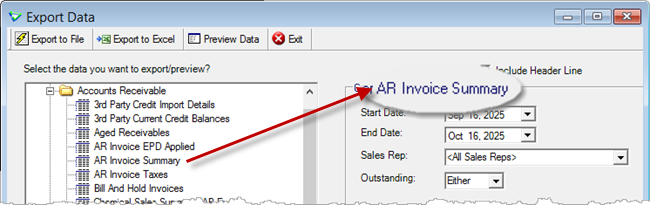
File > Exports > Data
| Export Name | What's New? |
|---|---|
| AR / 3rd Party Credit Import Details | criteria: Start Date, End Date data: Import Time |
| AR / 3rd Party Current Credit Balances | data: Account # (for extra privacy, last 4 characters only) |
| AR / Customers Without Sales | criteria: Active data: Active |
| INV Inventory Adjustments | data: [GL] Account Number |
| INV Inventory Forecast | data: ProdUnitID |
| INV Product Unit Types | data: Omit AR |
| GL / Fixed Asset Details | data: Fixed Asset ID, Location, Project |
| GL / Fixed Asset List | data: Fixed Asset ID |
| GL / GL Trial Balance | criteria: Include Budget |
Configuration Options
Company Config Options
Note
Company Configuration Options are managed by your local company agrē administrators. As with all new features, we don’t presume to know if your administrator would enable a new Config Item or not so we leave that up to them.
New config options are released OFF unless they are replacing/enhancing existing items, in which case we do our best to match existing functionality. Any exceptions would be noted.
| Tab / Subtab | Config Item | Description |
|---|---|---|
| Accounts Receivable / Loadout Tickets | Show WO Ref and Sub Type in Loadout Ticket grid | display column: WO Ref# (Sub Type) |
| Accounts Receivable / Customers | 3rd Party Credit | allow Duplicate Account Numbers |
| Accounts Receivable / Customers | Customer Account - Sales Rep Mandatory | default Sales Representative must be selected when saving customer accounts |
| Accounts Receivable / Customers | Customer Account - Account History Default | default date range of customer account history |
| Accounts Payable / Suppliers | Supplier Account - Account History Default | default date range of supplier account history |
| General Ledger | Shareholder Centre - Account History Default | default date range of shareholder account history |
| Inventory | Pricing | Product Price Check: Display Sale Price |
| Inventory | Inventory Adjustment Transfer Default - Calculate cost based on Outgoing Product |
base the estimated cost on the outgoing products instead of cost history of the incoming product |
| Reports / Email Defaults / Email Body Defaults | Default Email Body | [REFNO] available on all report emails except batch |
| Messages | Notify all users in specified role when | New Fixed Asset is created |
User Config Options
| Tab / Subtab | Config Item | Description |
|---|---|---|
| Email / Email Body Defaults | Report Email Defaults | [REFNO] available to all report emails except batch |
| Email / Signature Image | jpeg, jpg, jpe, png, gif, tif, or bmp | [SIGPIC] available to all report emails except batch |
| Account Centres | Account History Default | default account history dates |
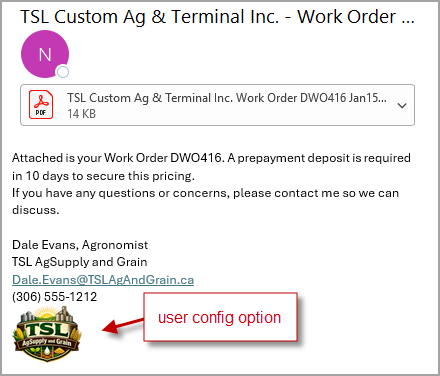
Email Signature Logo
New tab: Signature Image
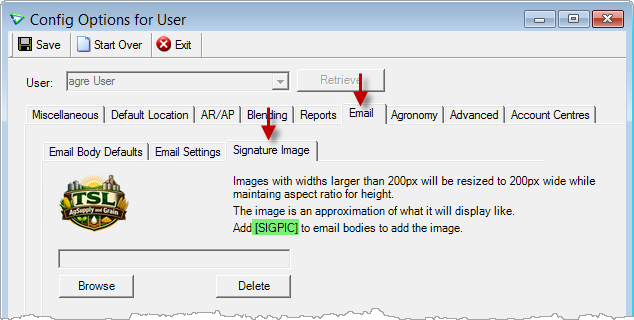
File > Config Options > User / Email / Signature Image
Add [SIGPIC] where you want your logo to appear (the [ ] are required).
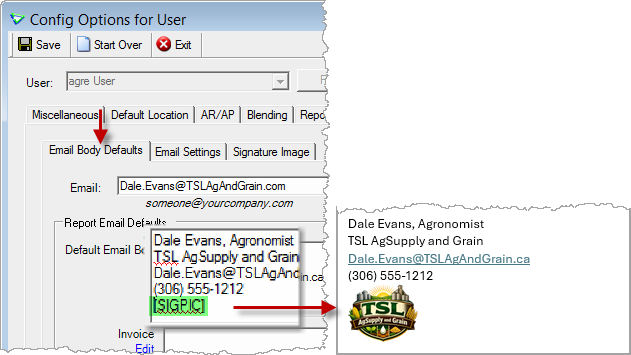
File > Config Options > User / Email / Email Body Defaults
Account Centres
New tab: Account Centres
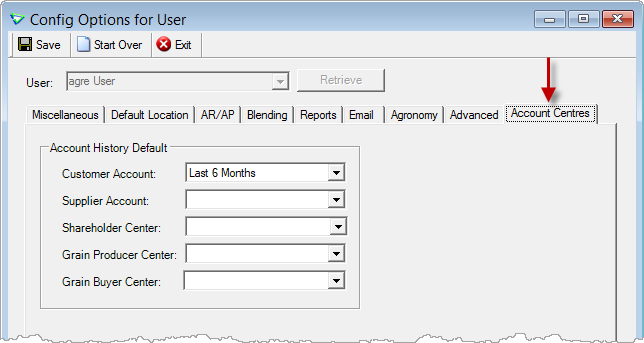
File > Config Options > User / Account Centres
Security
Note
Security settings are managed by your local company security administrators. As with all new features, we don’t presume to know who should have security permission and who should not so we leave that up to them.
New security permissions are released UNCHECKED unless they are enhancing existing permissions, in which case we do our best to match existing functionality. Any exceptions would be noted.
Role Permissions
| Tab | Item | Action(s) |
|---|---|---|
| Accounts Receivable | 3rd Party Credit | View Credit |
| Inventory | Adjustments | Add/Edit Transfer |
| General Ledger | Report - Fixed Asset Activity | View |
| Administration | Export Data | Work Order Changes Audit Work Order Details Changes |
 Grower Central
Request New ID
Growers can request a new account when Enable Request New User Page is checked.
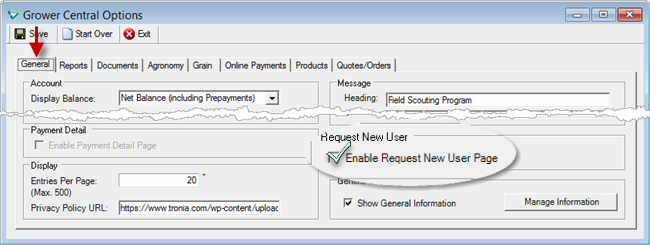
File > Config Options > Grower Central
A role is required to receive the request messages.
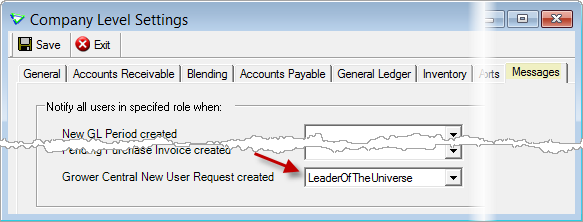
File > Config Options > Company
Review submitted requests in the Message Centre.
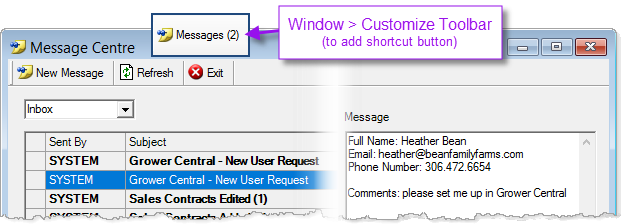
File > Messages
Grain Messages
Display messages on login for producers and buyers.
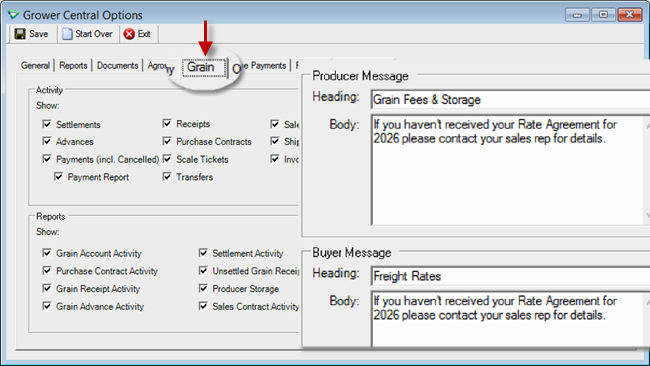
File > Config Options > Grower Central
Product Favourites
Growers can tag their favourite products to find them faster.
(heart colour matches text colour)
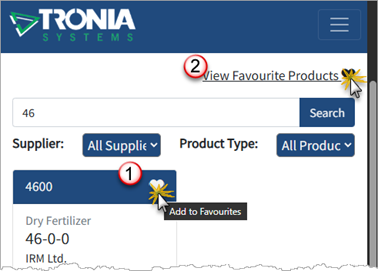
Grower Central
Grower Central Config Options
I want to read Configuring Grower Central (with lots of screenshots).
 Agronomy
Soil & Tissue Tests
AgVise
AgVise soil test results are now retrieved.
(deployed October 2025)
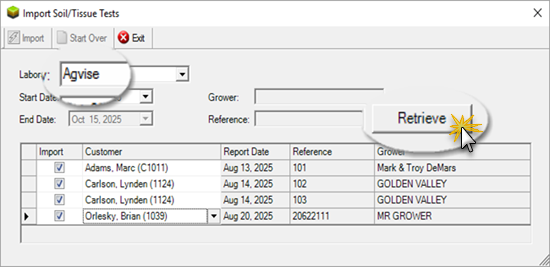
Agronomy > Soil/Tissue Tests
 Grain
Grain
Top 5 Grain Highlights from this Release
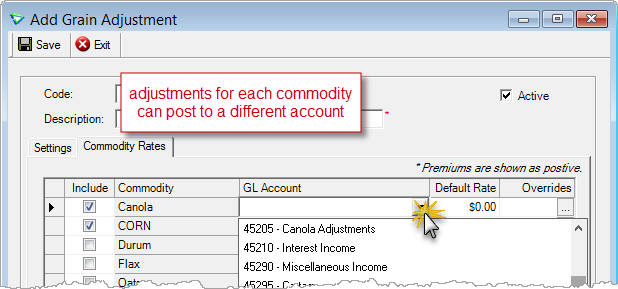
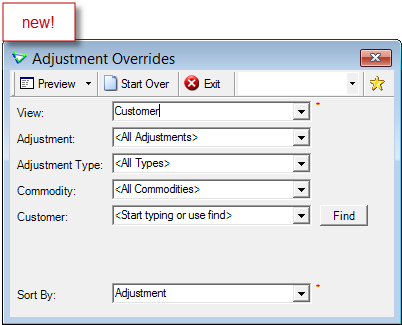
 Commodity Adjustments by GL Account
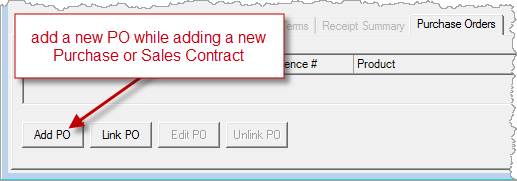
 Contracts - Add New PO on the fly
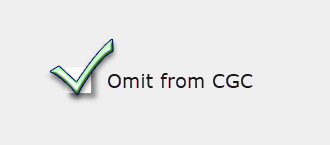
 Commodities & Producers – Omit from CGC Reporting
Manage
Commodities
Commodities can be excluded from CGC reporting.
(so can producers)
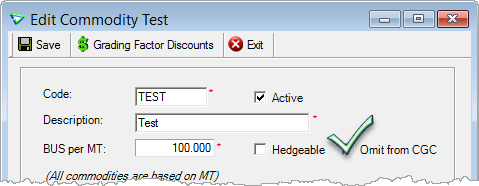
Grain > Manage > Commodities
Grading Factors
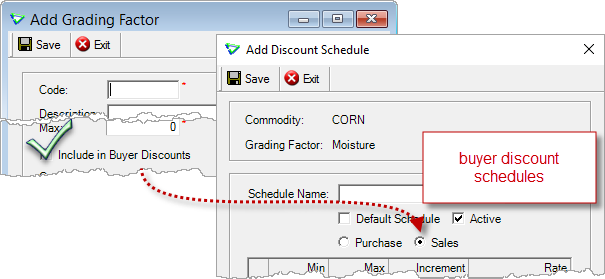
Grading Factors can apply to sales by checking Include in Buyer Discounts.
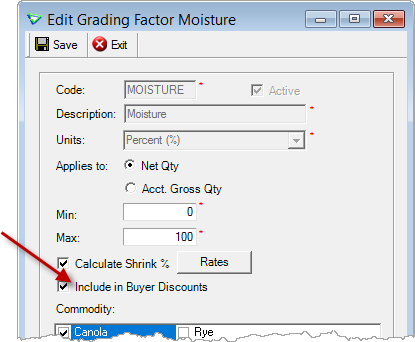
Grain > Manage > Grading Factors
Grading Factor Discounts
Add separate discount schedules for Sales.
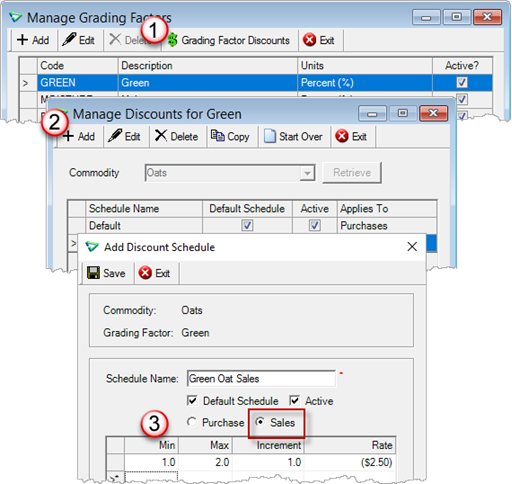
Grain > Manage > Grading Factors / Grading Factor Discounts
Adjustments
Search, Adjustment Type, and Calculation Method were added to the home form.
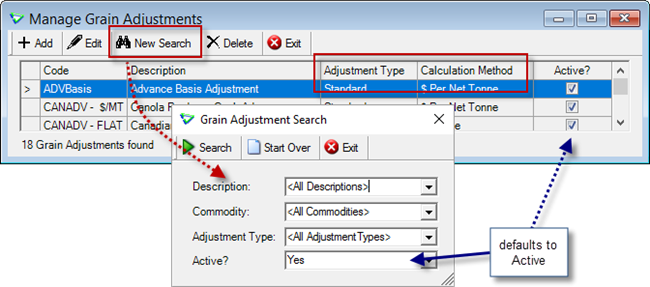
Grain > Manage > Adjustments
For each Adjustment, optionally post to different GL accounts based on Commodity.
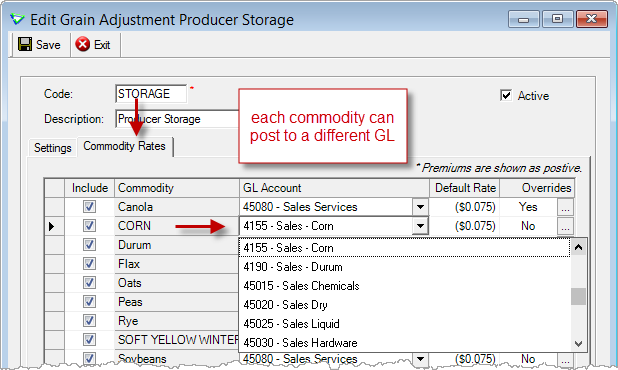
Grain > Manage > Adjustments
Shipping Methods
Add additional Delivery Methods to sales contracts.
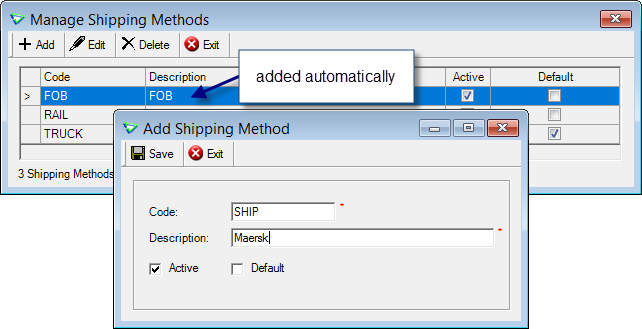
Grain > Manage > Manage Shipping Methods
Purchase Orders
Add new purchase orders right from the contract (purchase and sales).
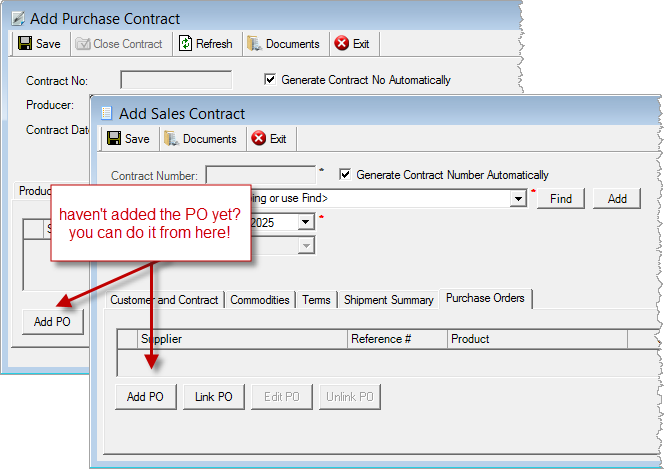
Grain > Purchase Contracts
Grain > Sales Contracts
Purchases
Producers
Producers can be excluded from CGC reporting.
(so can commodities)
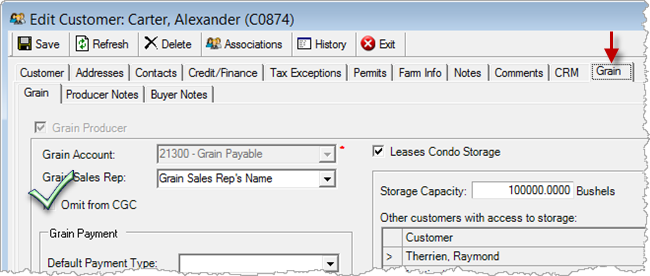
Accounts Receivable > Manage > Customers
Producer Centre
Scale Tickets
Receiving scale tickets are displayed on the producer account. The report is run from View Item.
Shipping scale tickets (for any grain returned to producer) are displayed only on the Scale Ticket home form.
That's where scale tickets are deleted.
Account History
Additional account history date ranges, ability to set default.
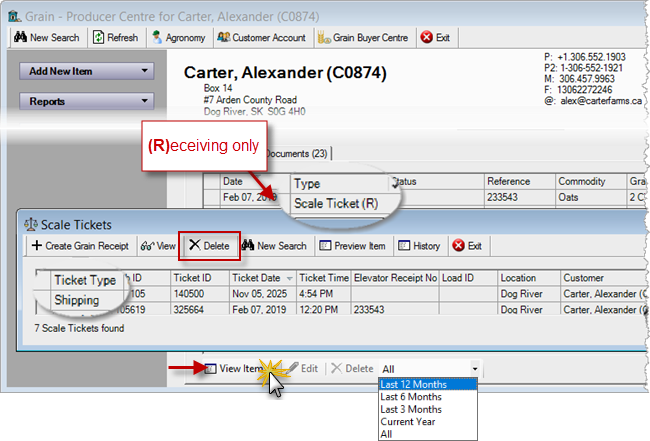
Grain > Grain Producer Centre
Grain > Scale Tickets
Receipts
Search for Returned receipts.
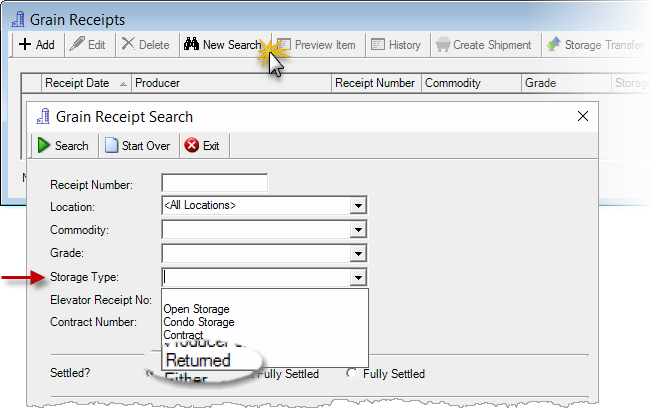
Grain > Grain Receipts
Transfer storage by Receipt.
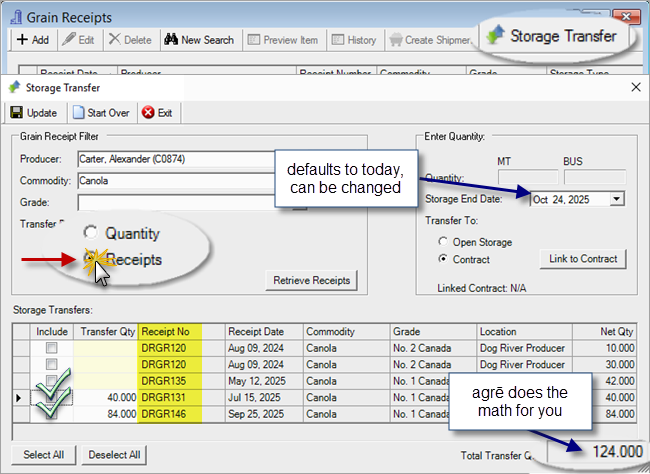
Grain > Grain Receipts
Sales
Buyer Centre
Account History
Additional account history date ranges, ability to set default.
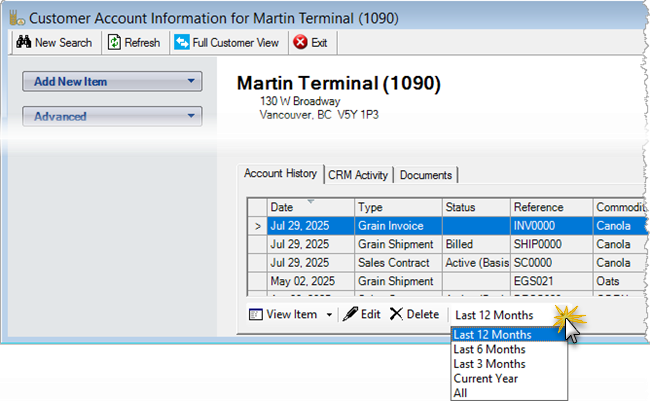
Grain > Grain Buyer Centre
Buyer Discounts
Starting on the Sales Contract, buyer discounts follow through to Invoice.
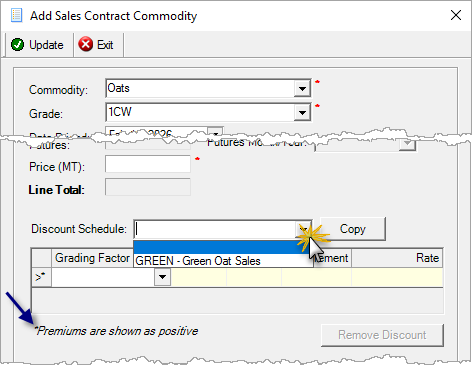
Grain > Sales Contracts / Add Commodity
Sales Contracts
Linked purchase order currency Totals are displayed.
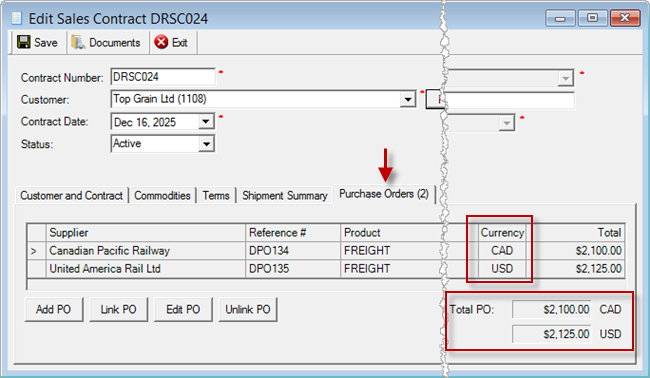
Grain > Sales Contracts
Shipments
Export Loads
Loaded Qty and Unloaded Qty added to Export Loads spreadsheet (which has a new file name and layout).
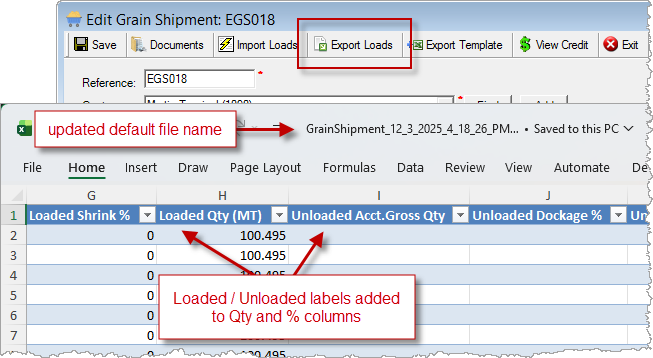
Grain > Shipments / Export Loads
Invoices
Each shipment row displays linked Sales Contract details.
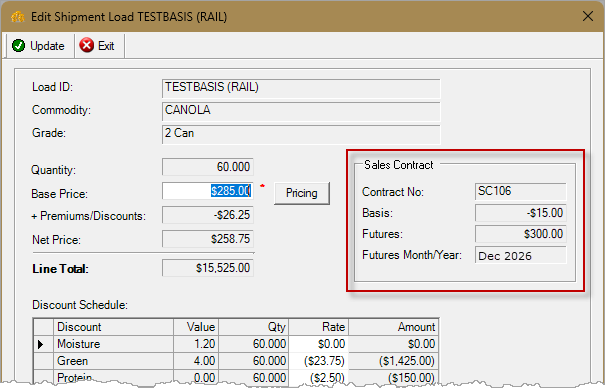
Grain > Grain Invoices / Edit Row
Grain Reports & Exports
Note
Security settings are managed by your local company security administrators. As with all new features, we don’t presume to know who should have access to new Grain Reports and Exports and who should not so we leave that up to them.
Updates to Current Grain Reports
| Report Name | What's New? |
|---|---|
| GL Account Transaction Detail | link from: Grain Transfer Balance JE# to: Journal Entry Detail report |
| GL Transaction Journal | link from: Grain Transfer Balance JE# to: Journal Entry Detail report |
| GL Unrealized Gain/Loss on Exchange | data: Grain Transfer Balance |
| Grain Inventory CGC | results: receipts from producers & commodities flagged as Omit from CGC are excluded |
| Grain Invoice Activity | criteria: Include Tax Totals data: Tax Totals (for each currency group) |
| Grain Receipt | criteria: Storage Type results: receipts of commodities flagged as Omit from CGC can be classed as Non-Producer Purchases |
| Grain Receipt Activity | criteria: Producer ComboFind, Storage Type [Returned] |
| Grain Transfer Balance | data: Location |
| Monthly Liability | results: producers & commodities flagged as Omit from CGC are excluded |
| Producer Liablilty CGC | layout: landscape data: Producer raw data: CommodityGradeDesc, LocationType (deployed Feb 27) |
| Product Liability | results: producers & commodities flagged as Omit from CGC are excluded |
Updates to Current Grain Exports
| Export Name | What's New? |
|---|---|
| Grain Invoice Summary | Sales Contract Comments (If multiple contracts exist, displays <Multiple>) |
Grain Configuration Options
Company Config Options
| Tab / Subtab | Config Item | Description |
|---|---|---|
| Grain / General | Producer Centre - Account History Default | default date range of producer account history |
| Grain / General | Buyer Centre - Account History Default | default date range of buyer account history |
| Grain / Sales | Grain Shipments - Default shipment discount value | discounts can be based on Loaded values or Unloaded values (if no unloaded values are entered, loaded values are used) |
User Config Options
| New Tab | Config Item | Description |
|---|---|---|
| Account Centres | Account History Default | default producer and buyer account history dates |
Account Centres
New tab: Account Centres
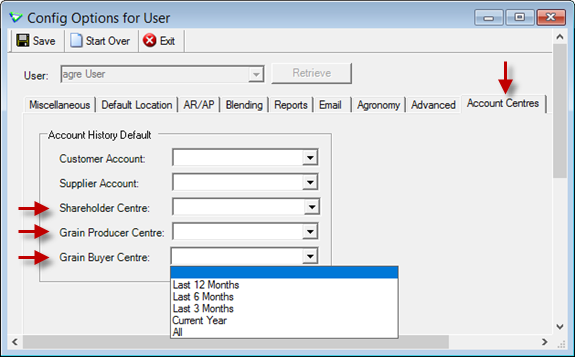
File > Config Options > User / Account Centres
agrē Hub
Hub Exports
| Export | What's New? |
|---|---|
| Inventory > Inventory Position |
criteria: Show In-Transit Details? data: Qty In Transit data (deployed October 2025): Product Type, Product Charateristic (comma-separtated list) |
agre.API
New Endpoints
| Endpoint | Description |
|---|---|
| ar/customeraccountactivitydeleted | list of deleted customer account activity (AR Transactions only) |
| inventory/inventoryreceipt | single inventory receipt with details |
Updates to Current Endpoints
| Endpoint | What's New? |
|---|---|
| ar/customeraccountactivity | parameter: createdChangedSince; (custID is now optional) |
| ap/purchaseorders | parameter: createdChangedSince (deployed November 2025) |
| grain/purchasecontractauthorization | AuthFlagUpdateDate, AuthTargetFlagUpdateDate updated when Authorized/TargetAuthorized is set |
Updates to Report PDFs
| Description | |
|---|---|
| AR Statement | dueDate |