 agrē Release Notes 2.25.01 - March 5, 2025
Last updated: March 5, 2025
What's New & Improved in agrē 2.5.01:
Additional process information from FCL may follow the release.
Security
This symbol  indicates that your Local Company Security Administrator needs to make a security permission change to allow user access to the new feature.
Configuration Options
This symbol  indicates a new feature integrates with a Configuration Option (at either the Company, Location, or User level).
Note
Release Notes highlight the best new features and improvements from each release of agrē. In case you missed a prior version, Release Notes for the last two years are available from the online Help Release Note archives.
 Top 5 agrē Highlights from this Release
 Leasing agent smarts from invoice added to the Work order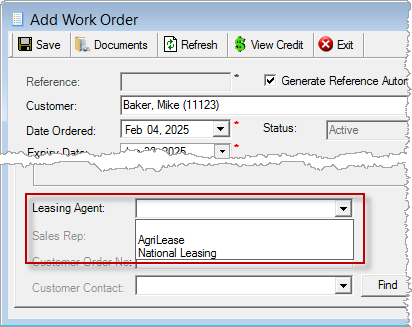
 Acre Rate Integration is Maintained by Mainframe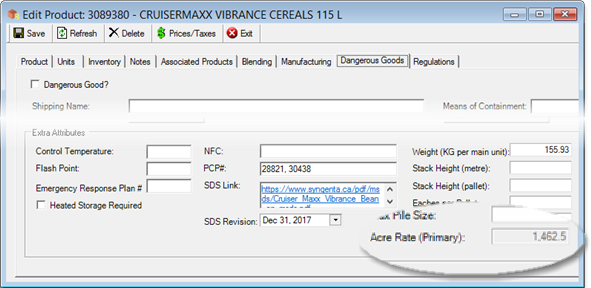
 Default Email bodies by Type (Invoice, Work Order, …)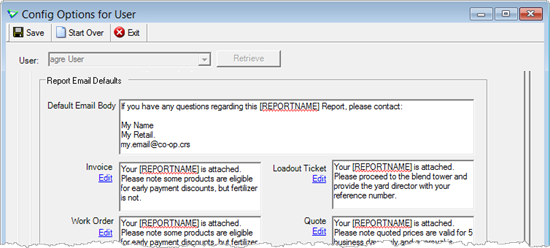
 Inventory Adjustments – new option to select Sub Types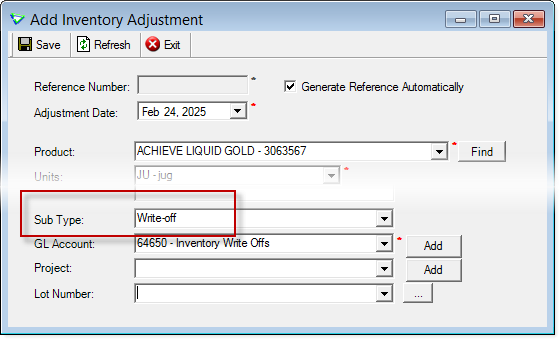
 New Adjustment/Manual count audit export (all info needed in one place)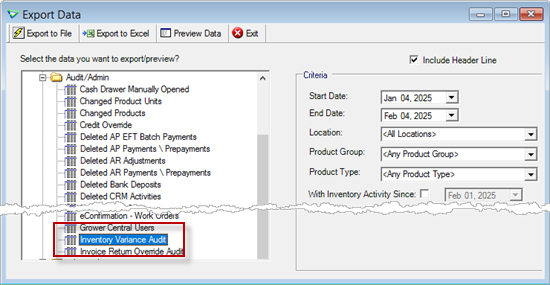
File
Manage Locations
Display different printed notes on Work Orders and Quotes.
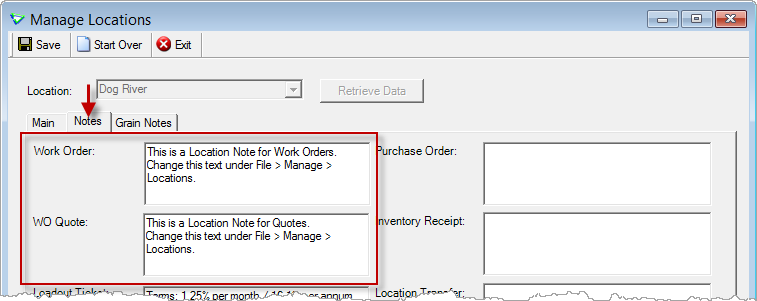
File > Manage > Locations
Accounts Receivable
Work Orders
Leasing
Similar to invoicing, Leasing Agent functionality has been added to work orders and quotes.
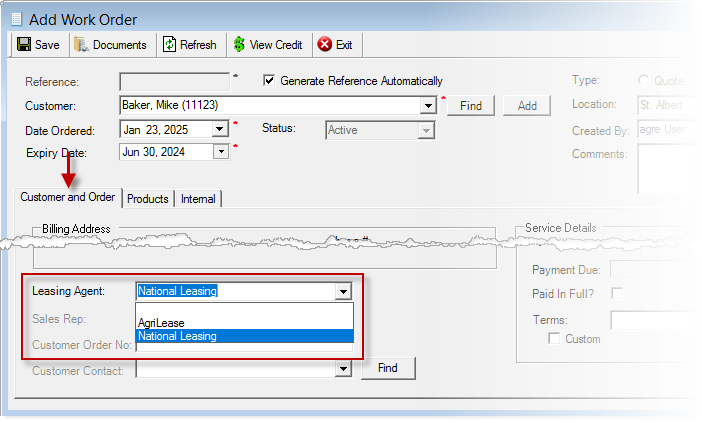
Accounts Receivable > Work Orders

I want to read the white paper (with lots of screenshots) about the FCL Leasing Agent Process.
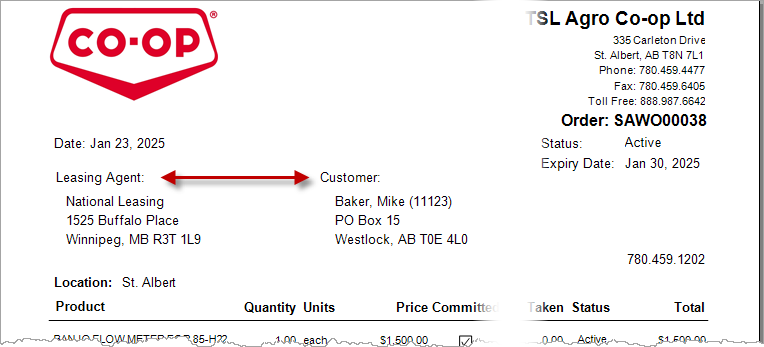
Both Customer and Leasing Agent display on the work order report.
Closing Expired
More filters makes finding just the orders and quotes you want faster.
Close and Extend Expiry dates at the same time.
Number of orders and quotes retrieved that meet the criteria is displayed.
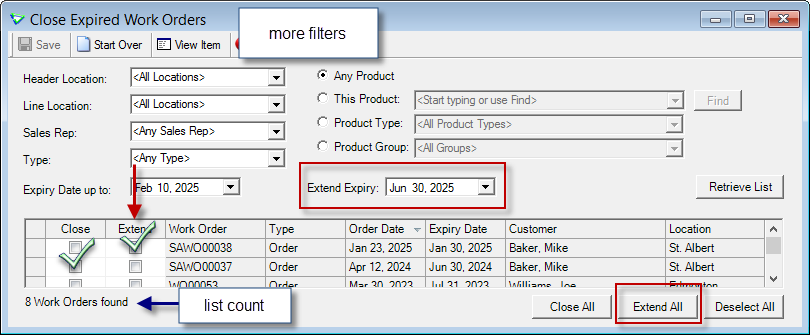
Accounts Receivable > Close Expired Work Orders
Managing
Operators
Description increased to 60 characters.
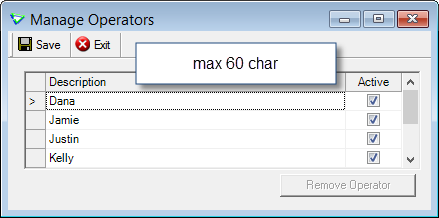
Accounts Receivable > Manage > Operators
Sales Reporting Partners: GOWAN and TKXS (Telus Ag)
As of January 1, 2025 GOWAN reports sales to Telus Ag (TKXS).
** Additional documentation regarding transition reporting of Gowan items to Telus Ag (TKXS) is available.
1. Tronia agrē: Crop Year 2024 Reporting GOWAN to TKXS (pdf)
2. Telus Ag PowerSuite: 2025 Guide for Submitting POS Data (pdf)
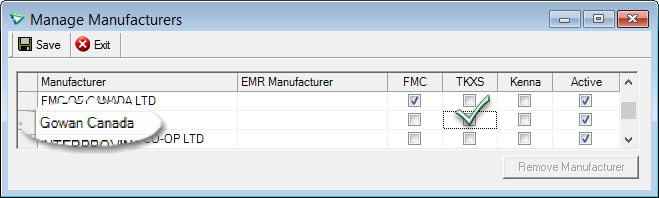
Inventory > Manage > Manufacturers
 Blending
Additional Products in Blends
Check Blend ...
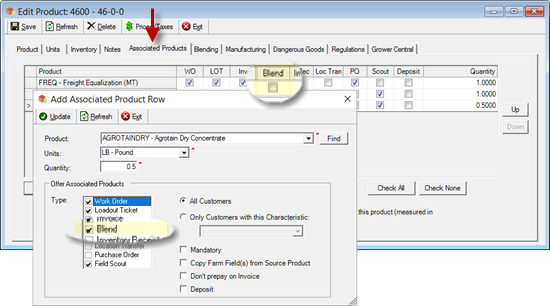
Inventory > Manage > Products
... you'll be prompted to add after calculating.
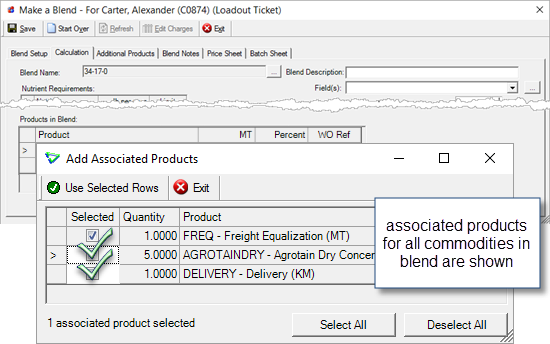
Blending > Make a Blend
Selected items are added to the Additional Products tab and can be edited if needed.
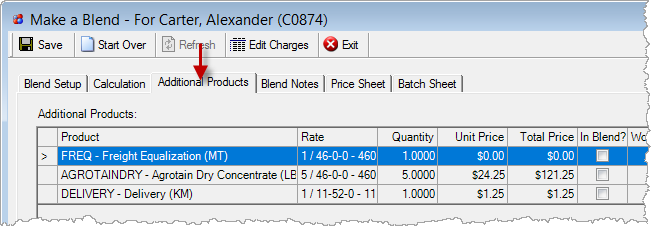
Blending > Make a Blend
I want to read the white paper (with lots of screenshots) on Associated Products.
Blend Types with Seed
Check Allow Additions of Seed to have added seed product affect the guaranteed minimum analysis.
(NPK and Blend Name only)
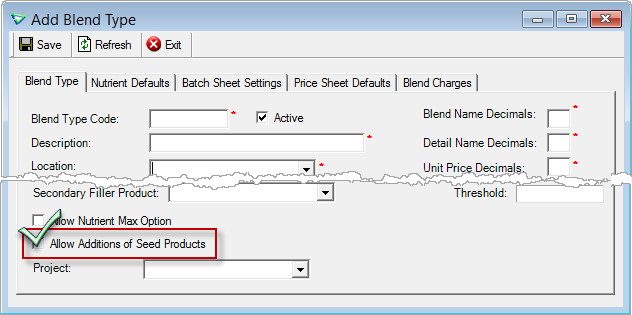
Blending > Manage > Blend Types
When blending, check Include Seed and you'll be prompted to add.
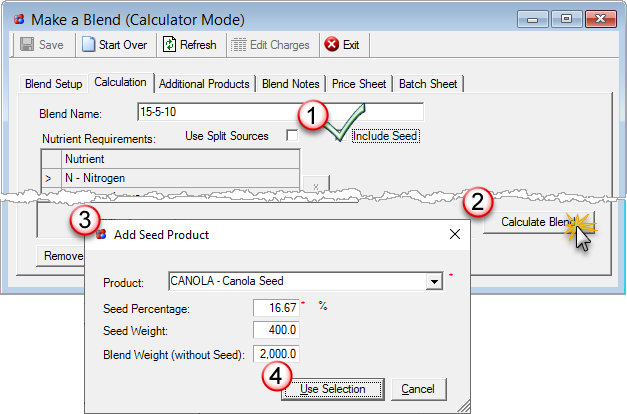
Blending > Make a Blend
Inventory
Adjustments - Sub Type
Manage Inventory Adjustment Sub Types and the GL will default automatically on adjustments.
Sub Type is included in the Inventory Variance Audit (new data export).
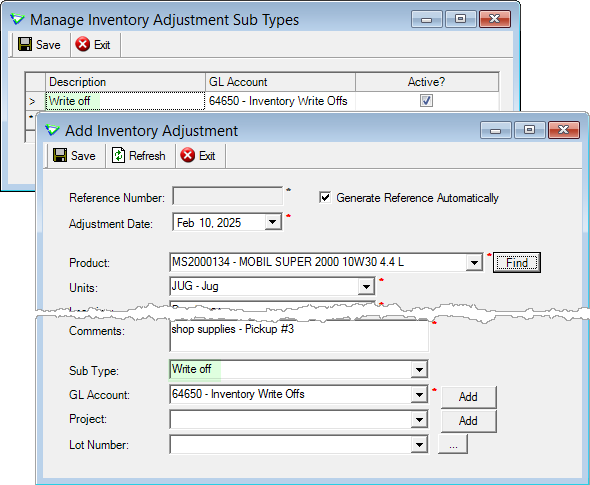
Inventory > Manage > Inventory Adjustment Sub Types
For Co-op retails (or CRS) if GL reporting is required then retails will need to input the applicable inventory adjustment costs into their accounting system, RCBK or JDE. This GL set up is mandatory for posting within agrē.
For more information please reach out to your CSC.
Manufacturing
Add Line Comments to raw products.
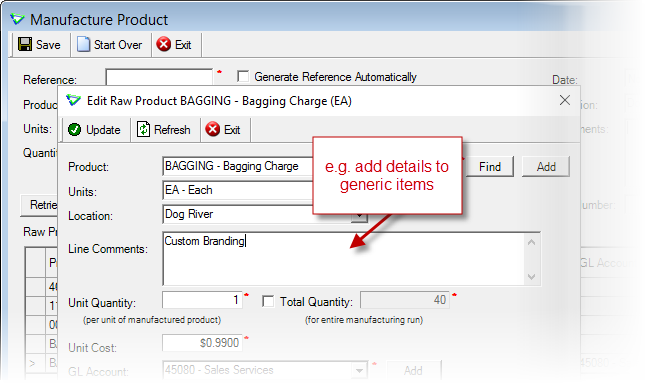
Inventory > Manufacturing
Line Comments are displayed on the Manufacturing Document report.
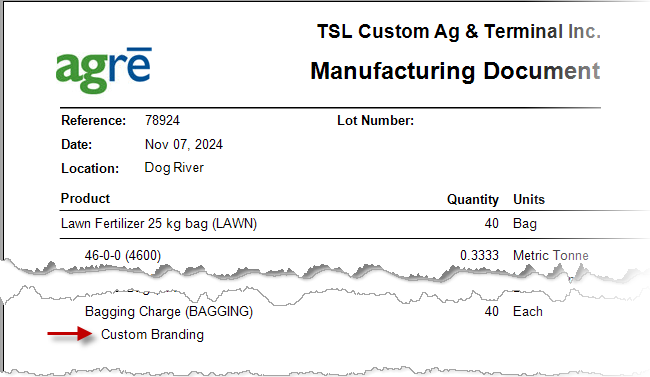
Inventory > Reports
Managing Products
Acre Rate (Primary)
On the Dangerous Goods tab, Standard Acre Rate renamed to Acre Rate (Primary) to encourage co-ops to populate the Acre Rates of unmapped products in the lowest sell-able unit.
- Mapped Items - maintained by mainframe
- Unmapped Items - maintained by retail
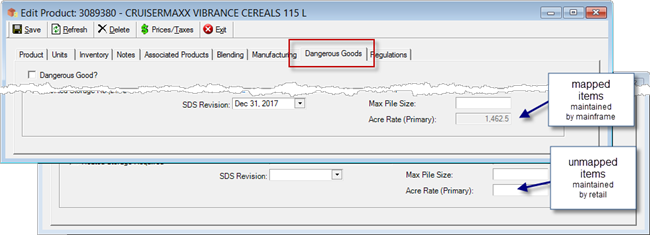
Inventory > Manage > Products
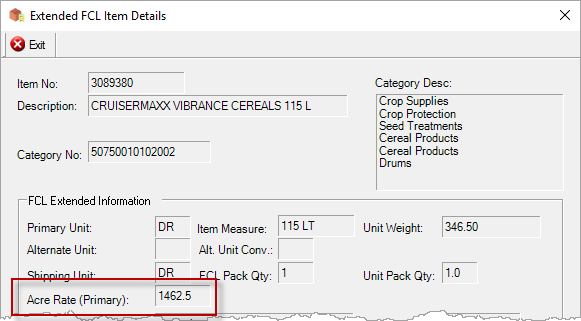
Acre Rate (Primary) displays on Extended FCL Item Details.
Acre Rate (Primary) is displayed on Product Price Check.
Most recent Recoup Cost is also displayed.
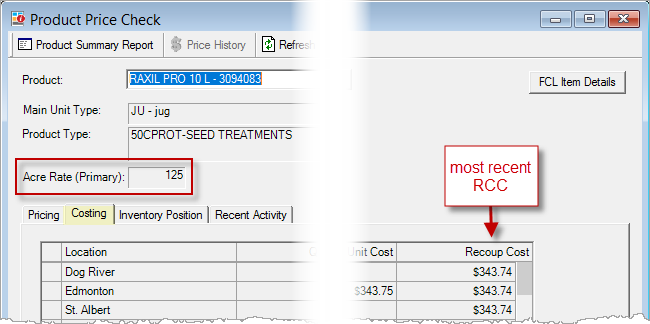
Inventory > Product Price Check
Transportation of Dangerous Goods
Exemption details added to Conditionally Exempt Dangerous Goods.
Totals display for Dangerous (including conditional), Non Dangerous, and Combined.
* deployed December 2024
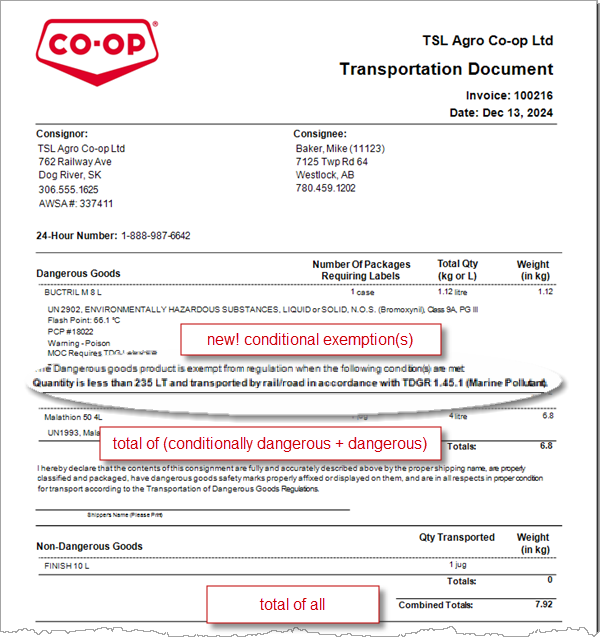
TDG Reports for Loadout Tickets, Invoices, Supplier Returns, Location Transfers, CRS Transfers
Inventory Variance Audit Export
Displays cost and variance for each product on Manual Counts (completed only) and Inventory Adjustments (with new Sub Types).
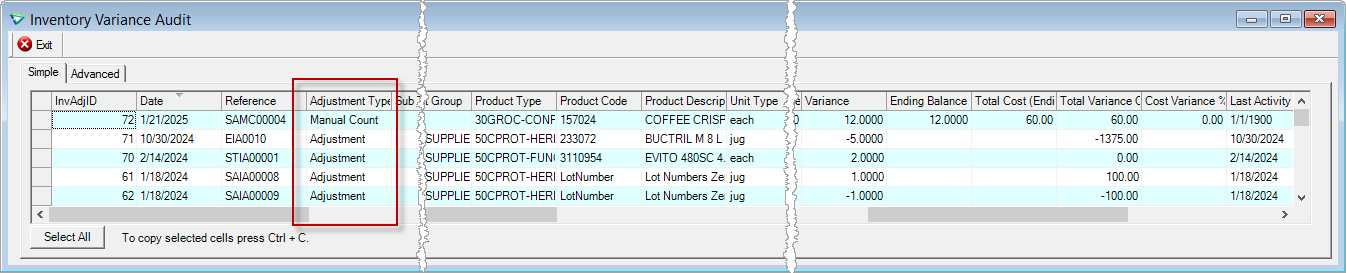
File > Exports > Data > Audit/Admin
Reports & Exports
Note
Security settings are managed by your local company security administrators. As with all new features, we don’t presume to know who should have access to new Exports and Reports and who should not so we leave that up to them.
Updates to Current Reports
| Report Name | What's New? |
|---|---|
| AR Work Order | data: Leasing Agent |
| AR Invoice | data: Cheque/Tracking No |
| INV Inventory Activity Reconciliation | raw data: Created By |
| INV Manufacturing Document | data: Line Comments |
| INV Transportation Document | layout: totals of dangerous goods (including conditionally dangerous), non dangerous, and all combined * hotfixed December 2024 |
New Exports
| Export Name | Description |
|---|---|
| INV Supplier Product Code Mapping | list of products with supplier mapping |
| Audit/Admin Inventory Variance Audit | cost and variance of inventory adjustments and manual counts (completed only) |
Updates to Current Exports
| Export Name | What's New? |
|---|---|
| AR Customer Sales | criteria: Exclude External Reporting new data: Audit Create Date/Time updated data: Header Time (all times in MST; changes column order) |
| AR Customer Sales Summary | criteria: Exclude External Reporting |
| AR Invoice Summary | new data: Audit Create Date/Time updated data: Header Time (all times in MST; changes column order) |
| AR Work Order Detail | data: ProdID |
| INV Inventory Adjustments | data: Sub Type |
| INV Inventory Activity | data: Created By |
| INV Inventory Received | data: Created By |
| INV Inventory Forecast | data: Period (start/end for custom dates) * hotfixed November 2024 |
| INV Product Prices vs Cost | data: RCC Cost is the most recent * hotfixed December 2024 |
| INV Product List | data: ManufProdCode, Acre Rate (Primary) (changes column order) |
| INV Taxes for Products | data: Mapped [Yes/No] (changes column order) |
Configuration Options
Note
Company Configuration Options are managed by your local company agrē administrators. As with all new features, we don’t presume to know if your administrator would enable a new Config Item or not so we leave that up to them.
New config options are released OFF unless they are replacing/enhancing existing items, in which case we do our best to match existing functionality. Any exceptions would be noted.
Default Email Body Text
Adding text for Invoice, Loadout Ticket, Work Order, Quote, or Purchase Order will override the system Default Email Body when emails are sent.
Email Body Defaults (email text) and Email Settings (mail server settings) are now on separate tabs.
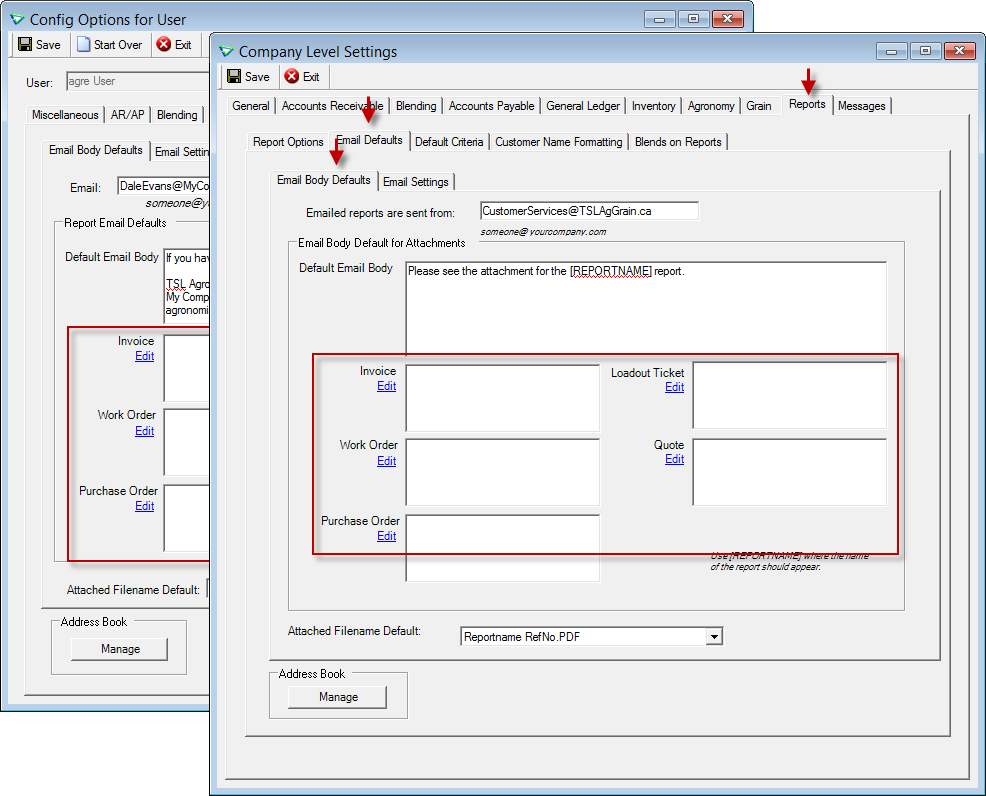
File > Config Options > User || File > Config Options > Company
Company Config Options
| Tab / Subtab | Config Item | Description |
|---|---|---|
| Reports / Report Options | Default Excel Format - Export to XLSX |
when exporting data from reports to Excel, the file format will always be XLSX |
| Reports / Email Defaults / Email Body Defaults | default email body text | use different default email text for Invoices, Loadout Tickets, Work Orders, Quotes, Purchase Orders |
User Config Options
| Tab / Subtab | Config Item | Description |
|---|---|---|
| Email / Email Body Defaults | email default text | use different default email text for Invoices, Loadout Tickets, Work Orders, Quotes, Purchase Orders |
Security
Note
Security settings are managed by your local company security administrators. As with all new features, we don’t presume to know who should have security permission and who should not so we leave that up to them.
New security permissions are released UNCHECKED unless they are enhancing existing permissions, in which case we do our best to match existing functionality. Any exceptions would be noted.
Role Permissions
| Tab | Item | Action(s) |
|---|---|---|
| Inventory | Adjustments | Edit GL Acct / Project Add/Edit Sub Type |
| Inventory | Inventory Adjustment Sub Type | Enable on menu, Manage |
| Inventory | Product Import Mapping | Enable on menu |
| Administration | Export Data | Inventory Variance Audit Supplier Product Code Mapping |
 Grower Central
Managing Users
Manage all Grower Central users from one location.
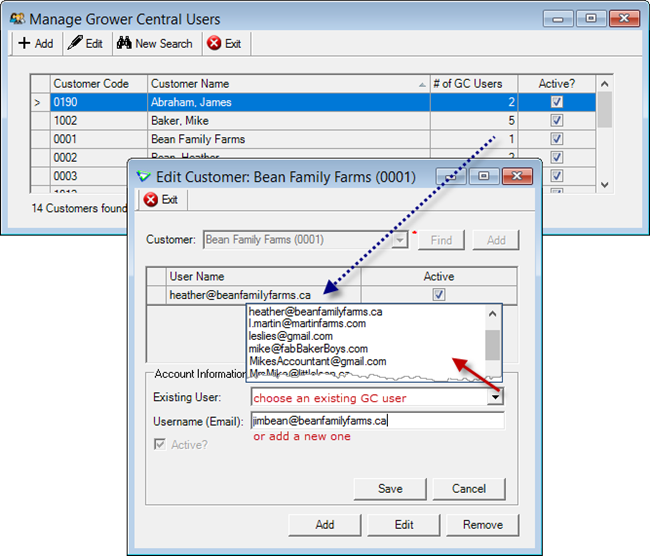
Accounts Receivable > Manage >Grower Central Users
Grower Central Config Options
General Tab
Payment Detail Page
Check Enable Payment Detail Page to display outstanding balance and overdue amounts - all the details of the Payments page, but without the payment.
(Payments must be disabled)
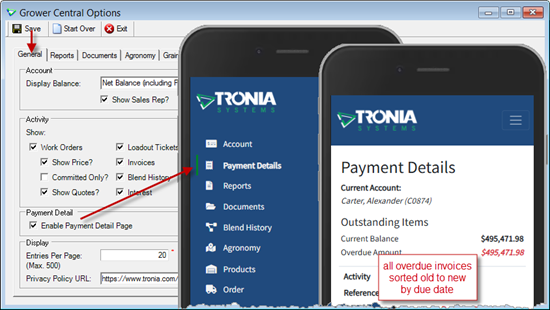
File > Config Options > Grower Central
Products Tab
Inventory by Location
In stock/Low stock refers to quantity at customer's home location.
Optionally include a link to display quantity at all locations.
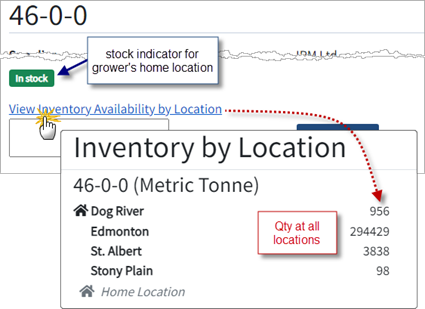
Products Page / View
Grower Central Config Options
I want to read the white paper (with lots of screenshots) about configuring Grower Central.
| Tab | Config Item | Description |
|---|---|---|
| General | Enable Payment Detail Page | display outstanding items (payments must be disabled) |
| Products | Show Stock Indicator | renamed from 'Show Quantity on Hand', can be displayed w/out enabling online orders |
| Products | Show Quantity On Hand By Location | displays link to popup of Qty at all locations, can be displayed w/out enabling online orders |
Security - Role Permissions
| Tab | Item | Action(s) |
|---|---|---|
| Accounts Receivable | Grower Central Customers | Edit (moved from Administration tab) |